Agent Squad · ManualManual
Documento para el comitéCommittee document

Manual del operador — Agent Squad The Operator's Manual — Agent Squad

El recorrido completo del producto en 34 pasos reales — qué hace el usuario, qué ve, y qué pasa por detrás — escrito para un comité mixto: funcionales, administrativos y arquitectos de tecnología senior. The complete product journey in 34 real steps — what the user does, what they see, and what happens behind the scenes — written for a mixed committee: business, administrative, and senior technology architects.

Documento vivo: cada paso verificado por un navegador real contra producción · última verificación · build c555aee Living document: every step verified by a real browser against production · last verification · build c555aee
Antes de empezarBefore you start

Cómo leer este documentoHow to read this document

Cada paso tiene cuatro piezas: lo que el usuario hace (una instrucción de 1-2 frases), la captura real de producción, un desplegable "Qué pasa por detrás" con la radiografía técnica, y un sello de verificación con fecha y hora. Each step has four pieces: what the user does (a 1-2 sentence instruction), the real production screenshot, a "Behind the scenes" collapsible with the technical x-ray, and a verification seal with date and time.

Si solo te interesa el producto, lee las instrucciones y mira las capturas. Si eres arquitecto, abre los desplegables — y al final tienes un anexo entero para ti. If you only care about the product, read the instructions and look at the screenshots. If you are an architect, open the collapsibles — and there is an entire annex for you at the end.

Un navegador automatizado (el harness tools/manual-walkthrough) recorre los 34 pasos contra producción, toma estas mismas capturas y escribe el resultado en verification.json. Este documento lee ese archivo cada vez que se abre: si algo dejara de funcionar, el sello del paso lo delataría aquí mismo. An automated browser (the tools/manual-walkthrough harness) walks the 34 steps against production, takes these very screenshots and writes the result to verification.json. This document reads that file every time it opens: if anything stopped working, the step's seal would expose it right here.

Para los no técnicosFor the non-technical

Resumen ejecutivo — el ciclo completoExecutive summary — the full cycle

Agent Squad es una oficina de agentes de IA que trabaja para ti bajo tu supervisión. El ciclo completo, de la primera visita al equipo que aprende: Agent Squad is an office of AI agents working for you under your supervision. The full cycle, from first visit to a team that learns:

RegistrarseSign up

Email + enlace de un solo uso, sin contraseñas que recordar. Un founder autoriza cada acceso: beta privada.Email + single-use link, no passwords to remember. A founder authorizes each access: private beta.

Definir tu vozDefine your voice

El briefing de tu oficina — a quién le hablas y cómo suenas — moldea todo lo que el equipo produce.Your office briefing — who you talk to and how you sound — shapes everything the team produces.

Lanzar trabajoLaunch work

Eliges un SuperSkill del catálogo y lo lanzas con un clic. El motor hace el resto.Pick a SuperSkill from the catalog and launch it with one click. The engine does the rest.

Verlo correr, con costoWatch it run, with cost

Cada ejecución muestra su avance paso a paso y su costo acumulado en dólares. Sin cajas negras.Every run shows step-by-step progress and accumulated cost in dollars. No black boxes.

AprobarApprove

Cada entregable espera tu decisión hasta 24 horas. Tú tienes la última palabra, siempre.Every deliverable waits up to 24 hours for your decision. You always have the final word.

El equipo aprendeThe team learns

Cada aprobación —y cada comentario— se guarda como memoria que los próximos trabajos consultan.Every approval —and every comment— is stored as memory that future work consults.

Cada aprobación humana se vuelve memoria estructurada del equipo. Every human approval becomes structured team memory.
CAPÍTULO 1CHAPTER 1

EntradaEntry

PASOS 1–8STEPS 1–8
01

Demo pública — SpectatePublic Demo — Spectate

◐ DEMO

Abre app.agentsquadai.com/demo y recorre la oficina 3D. No necesitas cuenta: es el showroom público del producto. Open app.agentsquadai.com/demo and explore the 3D office. No account needed: it is the product's public showroom.
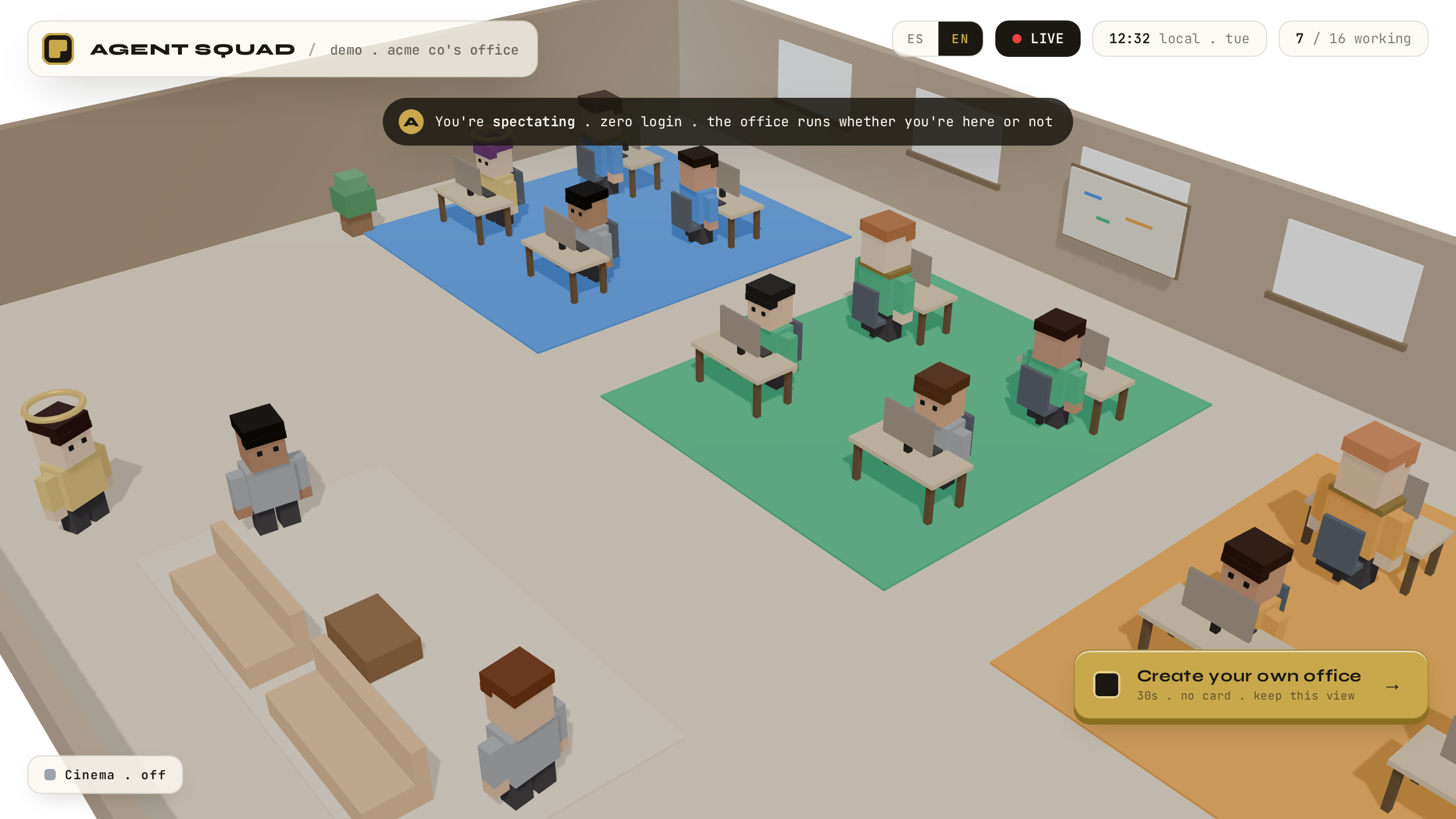
Demo pública — oficina 3D Spectate
VERIFICADOVERIFIED
Qué pasa por detrásBehind the scenes

Página estática más una escena 3D (Three.js vía Threlte) que se renderiza por completo en tu navegador. Sin sesión y sin llamadas al backend. Los 16 agentes y sus historias son contenido de demostración deliberado — por eso esta página, y solo esta, lleva la etiqueta DEMO. Es una decisión de producto: un showroom que se puede enseñar sin fricción, claramente separado del sistema real que empieza en el paso siguiente.

A static page plus a 3D scene (Three.js via Threlte) rendered entirely in your browser. No session, no backend calls. The 16 agents and their stories are deliberate demo content — which is why this page, and only this one, carries the DEMO label. It is a product decision: a showroom you can present without friction, clearly separated from the real system that starts on the next step.
02

Pantalla de accesoWelcome / Auth screen

● PRODUCTIVO● PRODUCTION

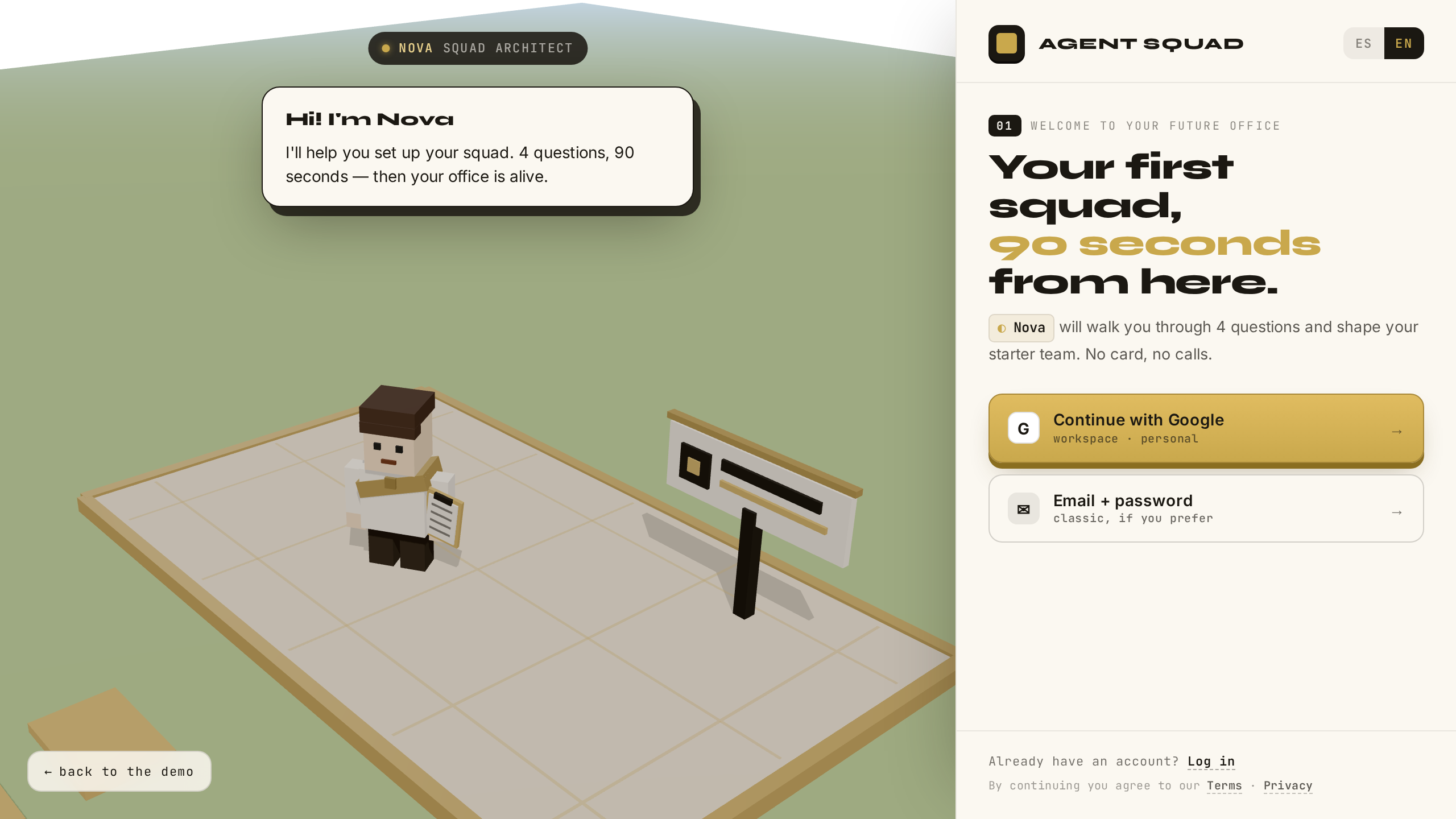
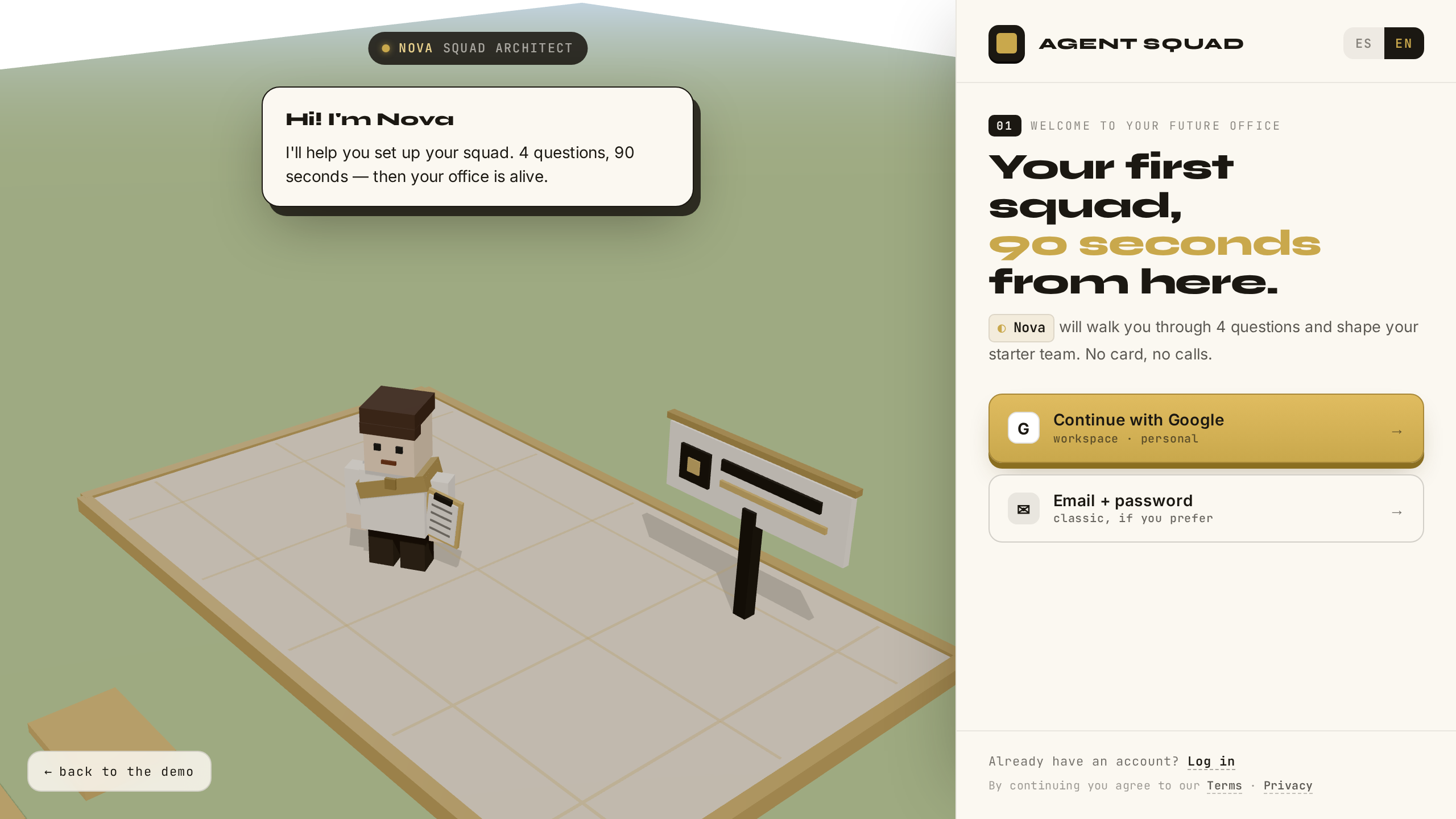
Ve a la pantalla de acceso y elige crear una cuenta nueva. Go to the auth screen and choose to create a new account.

Pantalla de acceso
VERIFICADOVERIFIED
Qué pasa por detrásBehind the scenes

Desde aquí estás en la app real: SvelteKit 5 servida por Vercel — serverless y stateless, sin servidores propios que mantener en esta capa. La identidad del usuario vive en InsForge (un backend-as-a-service: la plataforma que guarda usuarios y su estado). La app le habla solo desde el servidor: el navegador nunca ve llaves privilegiadas.

From here on you are in the real app: SvelteKit 5 served by Vercel — serverless and stateless, no servers of our own to maintain at this layer. User identity lives in InsForge (a backend-as-a-service: the platform that stores users and their state). The app talks to it server-side only: the browser never sees privileged keys.

03

Formulario de registroSignup form

● PRODUCTIVO● PRODUCTION

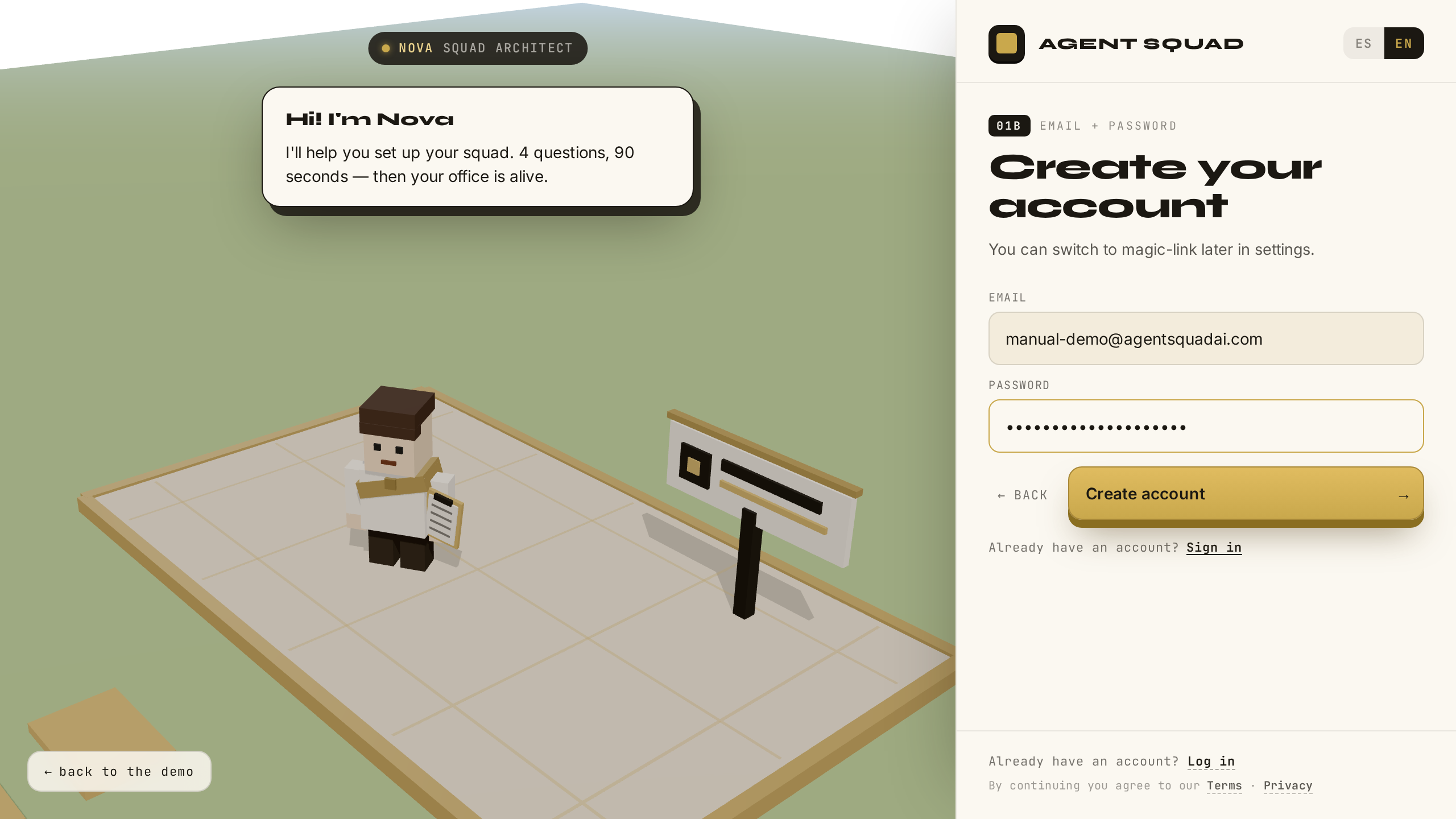
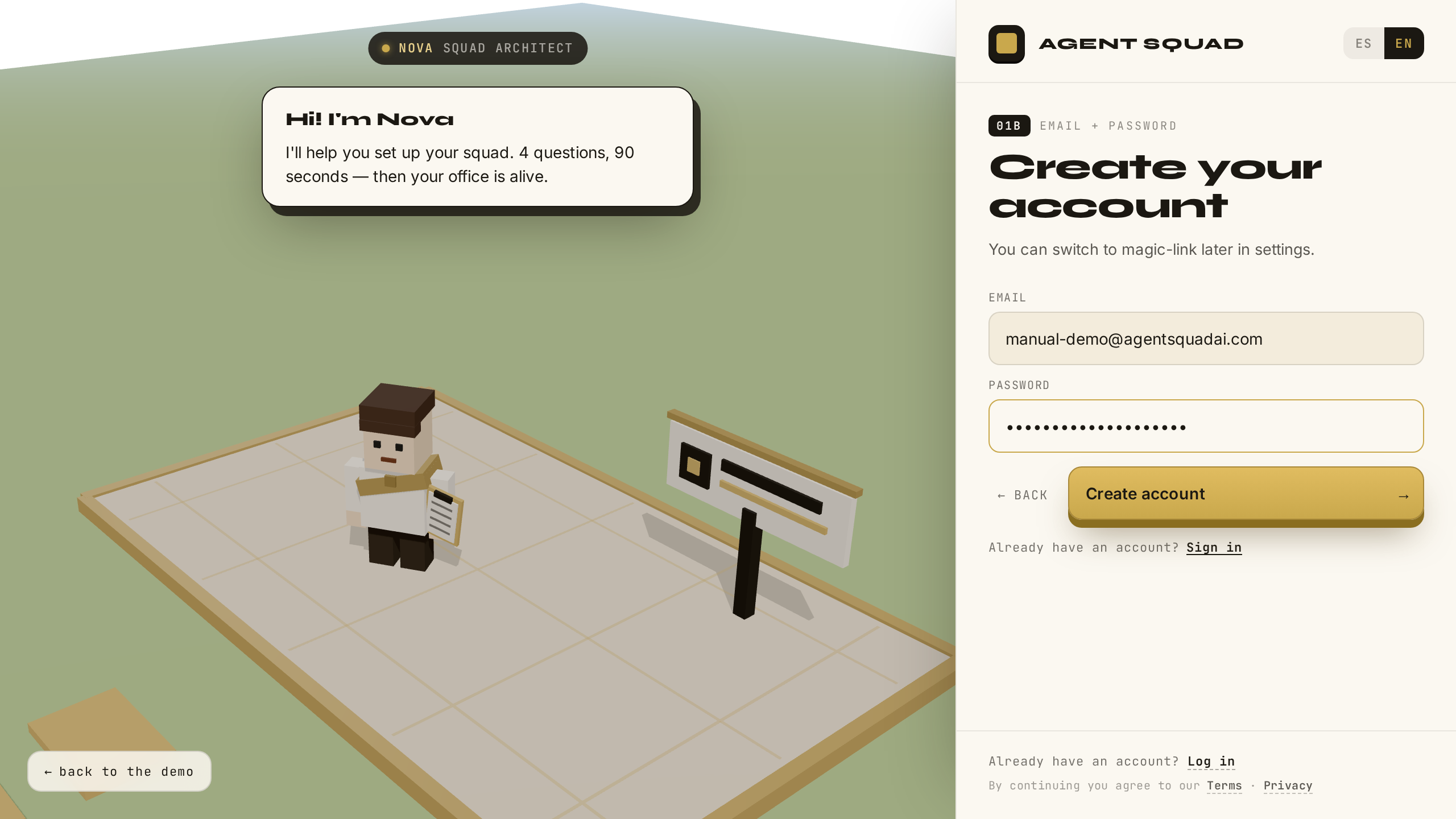
Completa tu email y una contraseña, y envía el formulario. Fill in your email and a password, and submit the form.

Formulario de registro
VERIFICADOVERIFIED
Qué pasa por detrásBehind the scenes

El SDK de InsForge crea el usuario en auth.users, con la contraseña hasheada por la plataforma — la app nunca almacena contraseñas. Inmediatamente después, la app hace un login server-side (client_type=server) para capturar el refresh token, que el SDK de navegador no expone a propósito: ese token solo debe existir del lado del servidor.

The InsForge SDK creates the user in auth.users, with the password hashed by the platform — the app never stores passwords. Right after, the app performs a server-side login (client_type=server) to capture the refresh token, which the browser SDK deliberately does not expose: that token should only ever exist server-side.

04

Email de verificación enviadoVerification email sent

● PRODUCTIVO● PRODUCTION

Mira la pantalla de confirmación: el sistema acaba de enviarte un email de verificación a tu bandeja. Look at the confirmation screen: the system just sent a verification email to your inbox.

Email de verificación enviado
VERIFICADOVERIFIED
Qué pasa por detrásBehind the scenes

El servidor genera un magic link (un enlace de un solo uso que inicia sesión sin teclear contraseña): un token aleatorio criptográfico (CSPRNG) de 256 bits, registrado en la tabla magic_links con expiración de 15 minutos. El email sale por Resend, SMTP transaccional con dominio verificado.

The server generates a magic link (a single-use link that signs you in without typing a password): a 256-bit cryptographically random (CSPRNG) token, recorded in the magic_links table with a 15-minute expiry. The email goes out through Resend, transactional SMTP on a verified domain.

05

Email con magic link (template real)Magic link email (real template)

● PRODUCTIVO● PRODUCTION

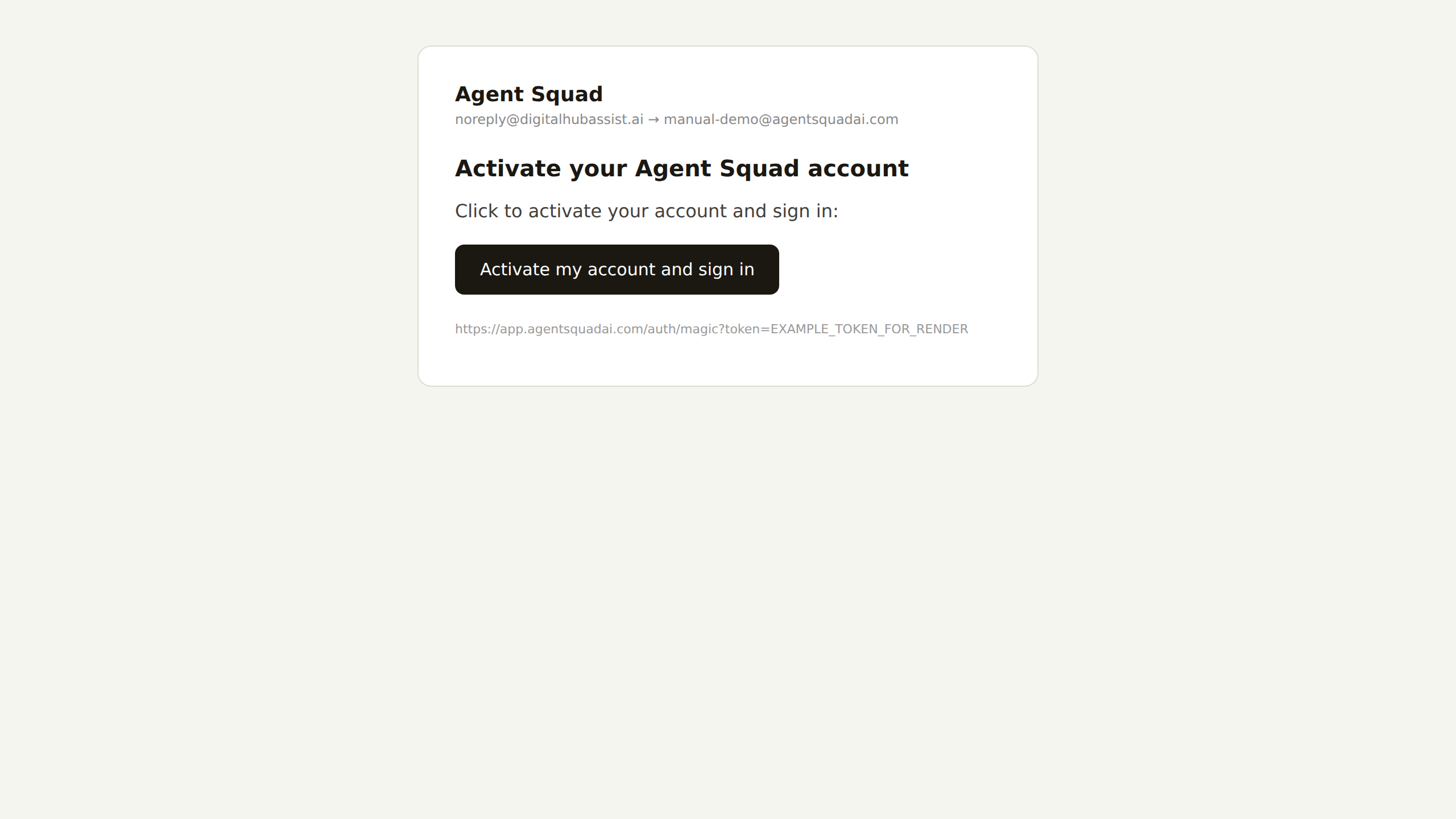
Abre tu correo: el email llega con el template real de la marca. Haz clic en el botón de acceso. Open your inbox: the email arrives with the real brand template. Click the access button.

Email con magic link
VERIFICADOVERIFIED
Qué pasa por detrásBehind the scenes

Lo que ves es el template de producción, no una maqueta. El detalle de ingeniería importante está en el destino del botón: el enlace no inicia sesión con solo abrirse — eso se resuelve en el paso siguiente, y la razón es más interesante de lo que parece.

What you see is the production template, not a mockup. The important engineering detail is in the button's destination: the link does not sign you in just by being opened — that resolves in the next step, and the reason is more interesting than it looks.

06

Magic link — interstitial + autologin realMagic link — interstitial + real autologin

● PRODUCTIVO● PRODUCTION

El enlace abre una pantalla intermedia de un segundo y entras con la sesión iniciada. Sin teclear nada. The link opens a one-second interstitial screen and you are in, signed in. Without typing anything.

Interstitial del magic link
VERIFICADOVERIFIED
Qué pasa por detrásBehind the scenes

El interstitial existe por una razón concreta: los scanners de seguridad de los inboxes corporativos pre-visitan los enlaces de cada email. Si el GET consumiera el token, el scanner lo quemaría antes del clic humano. Por eso el consumo real es un POST atómico de un solo uso: un UPDATE condicional (consumed_at IS NULL) en el que gana exactamente un request. La sesión queda en una cookie httpOnly/secure con access + refresh token; el servidor la renueva solo cuando expira (~15 min) — el usuario no vuelve a ver una pantalla de login.

The interstitial exists for a concrete reason: corporate inbox security scanners pre-visit every link in an email. If the GET consumed the token, the scanner would burn it before the human click. So the real consumption is an atomic one-time POST: a conditional UPDATE (consumed_at IS NULL) where exactly one request wins. The session lands in an httpOnly/secure cookie holding access + refresh tokens; the server renews it on its own when it expires (~15 min) — the user never sees a login screen again.

07

Gate de acceso — Priority AccessAccess gate — Priority Access

● PRODUCTIVO● PRODUCTION

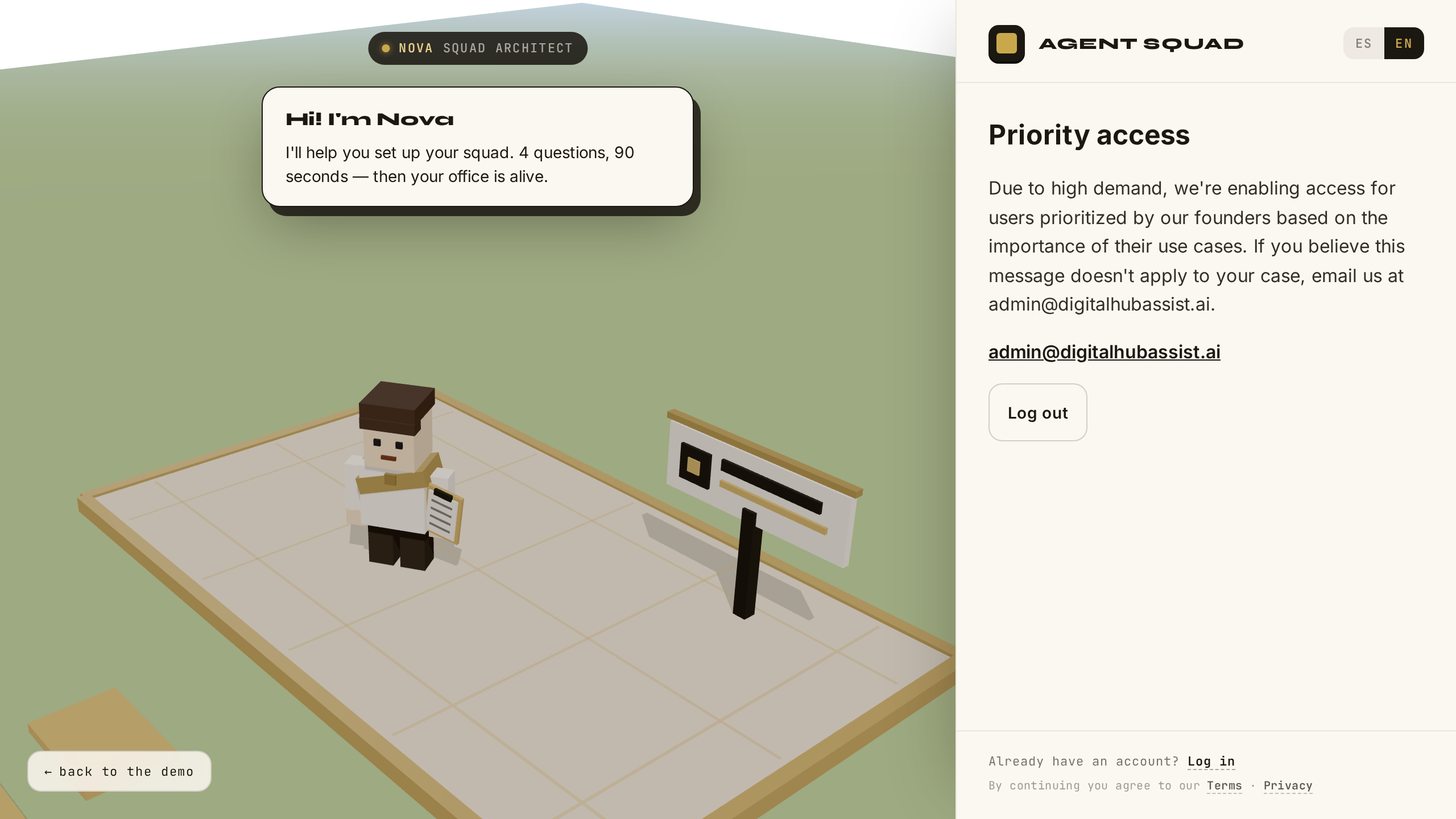
Con la cuenta nueva llegas al gate de Priority Access: la app te reconoce, pero aún no estás autorizado a entrar. With the new account you hit the Priority Access gate: the app knows you, but you are not yet authorized to enter.

Gate de Priority Access
VERIFICADOVERIFIED
Qué pasa por detrásBehind the scenes

El gate es una tabla user_access en InsForge con authorized boolean default false. El hook del servidor la lee en cada request con la service key, en modo fail-closed: si la lectura falla por cualquier motivo, el usuario NO está autorizado. Es la mecánica de la beta privada — el default es la puerta cerrada.

The gate is a user_access table in InsForge with authorized boolean default false. The server hook reads it on every request with the service key, in fail-closed mode: if the read fails for any reason, the user is NOT authorized. It is the private-beta mechanic — the default is a closed door.

08

Autorizar usuario (acción de founder)Authorize user (founder action)

● PRODUCTIVO● PRODUCTION

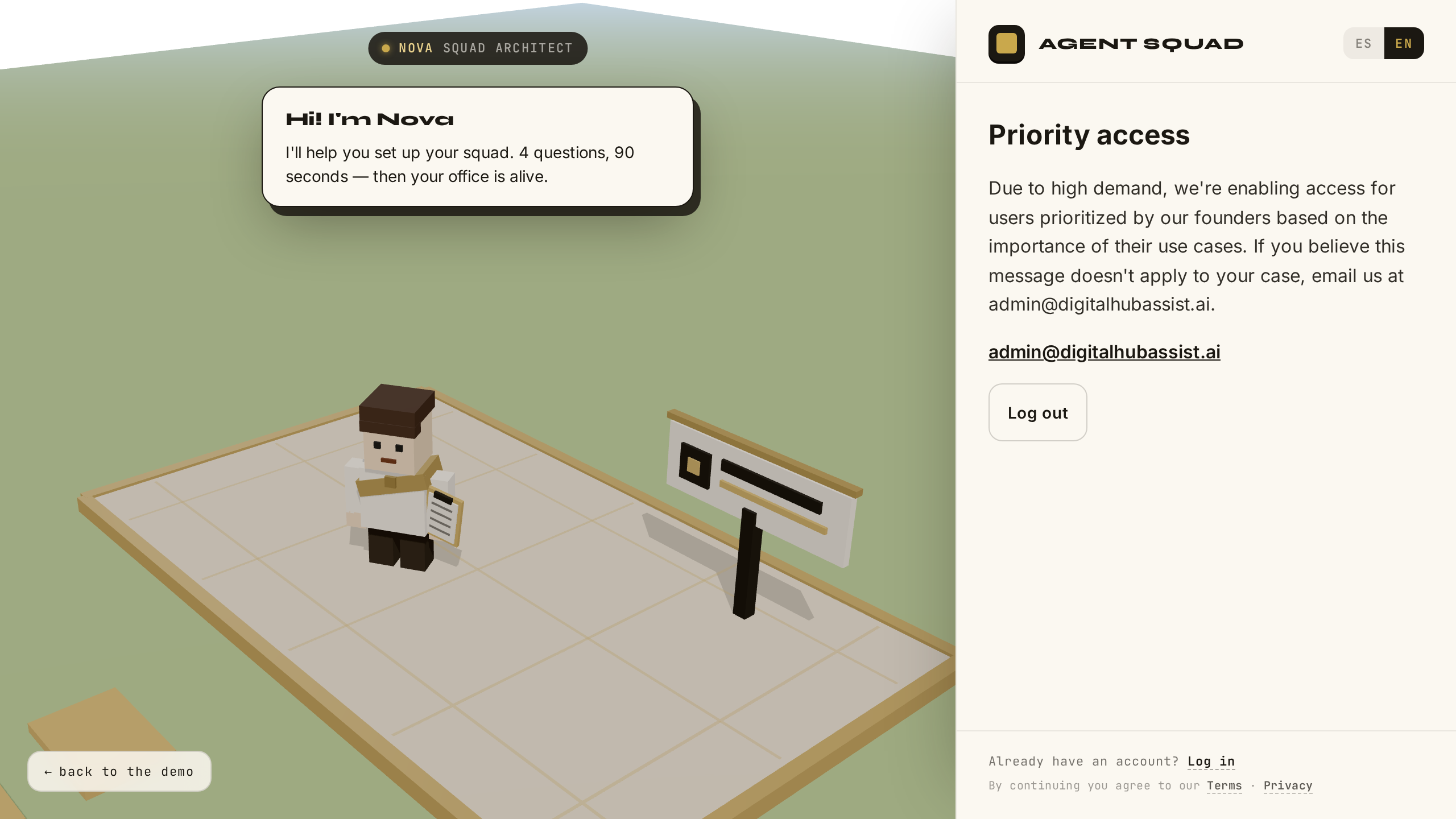
Un founder autoriza tu cuenta. Al recargar, el gate desaparece y la oficina te espera. A founder authorizes your account. On reload, the gate is gone and the office awaits.

Autorización de usuario
VERIFICADOVERIFIED
Qué pasa por detrásBehind the scenes

Solo un founder puede poner authorized=trueno existe autoservicio. Quién entra a la beta es una decisión humana explícita, no un toggle que el usuario pueda activarse a sí mismo. Esta captura muestra esa acción del lado del founder.

Only a founder can set authorized=truethere is no self-service. Who enters the beta is an explicit human decision, not a toggle users can flip on themselves. This screenshot shows that action from the founder's side.

CAPÍTULO 2CHAPTER 2

Onboarding

PASOS 9–13STEPS 9–13
09

Onboarding — Q1: nombre de oficinaOnboarding — Q1: office name

● PRODUCTIVO● PRODUCTION

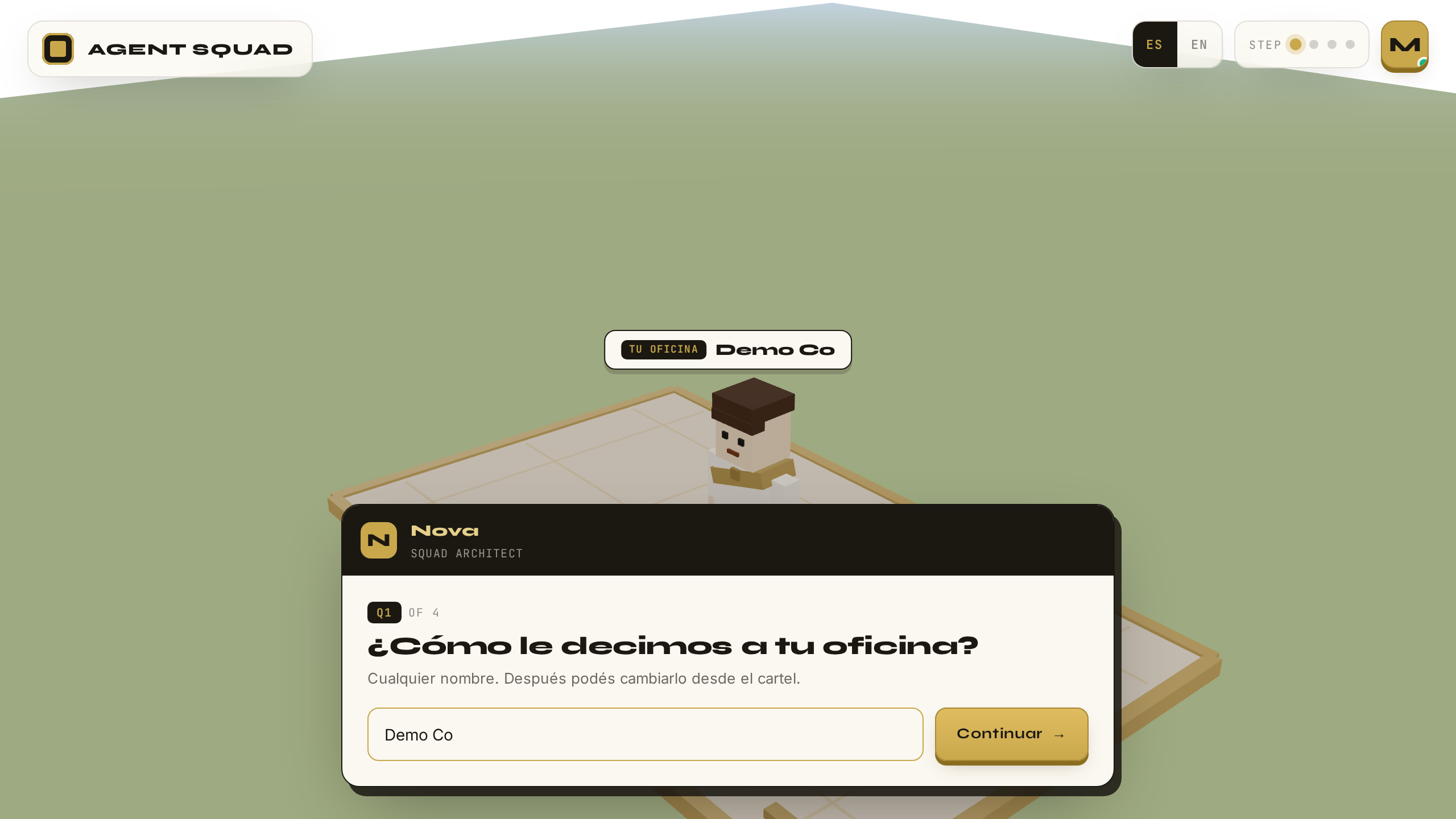
Nova, la guía del onboarding, te recibe. Escribe el nombre de tu oficina. Nova, the onboarding guide, greets you. Type your office's name.

Onboarding Q1 — nombre de oficina
VERIFICADOVERIFIED
Qué pasa por detrásBehind the scenes

Nova es aquí una guía de interfaz: una conversación estructurada, sin LLM en este paso. Es una decisión deliberada — cero latencia y cero costo en el funnel de entrada, donde cada segundo de espera cuesta conversión. La IA de verdad entra donde aporta: en el trabajo, no en el formulario.

Nova here is a UI guide: a structured conversation, no LLM at this step. A deliberate decision — zero latency and zero cost in the entry funnel, where every second of waiting costs conversion. The real AI enters where it adds value: in the work, not in the form.

10

Onboarding — Q2: uso principalOnboarding — Q2: main use

● PRODUCTIVO● PRODUCTION

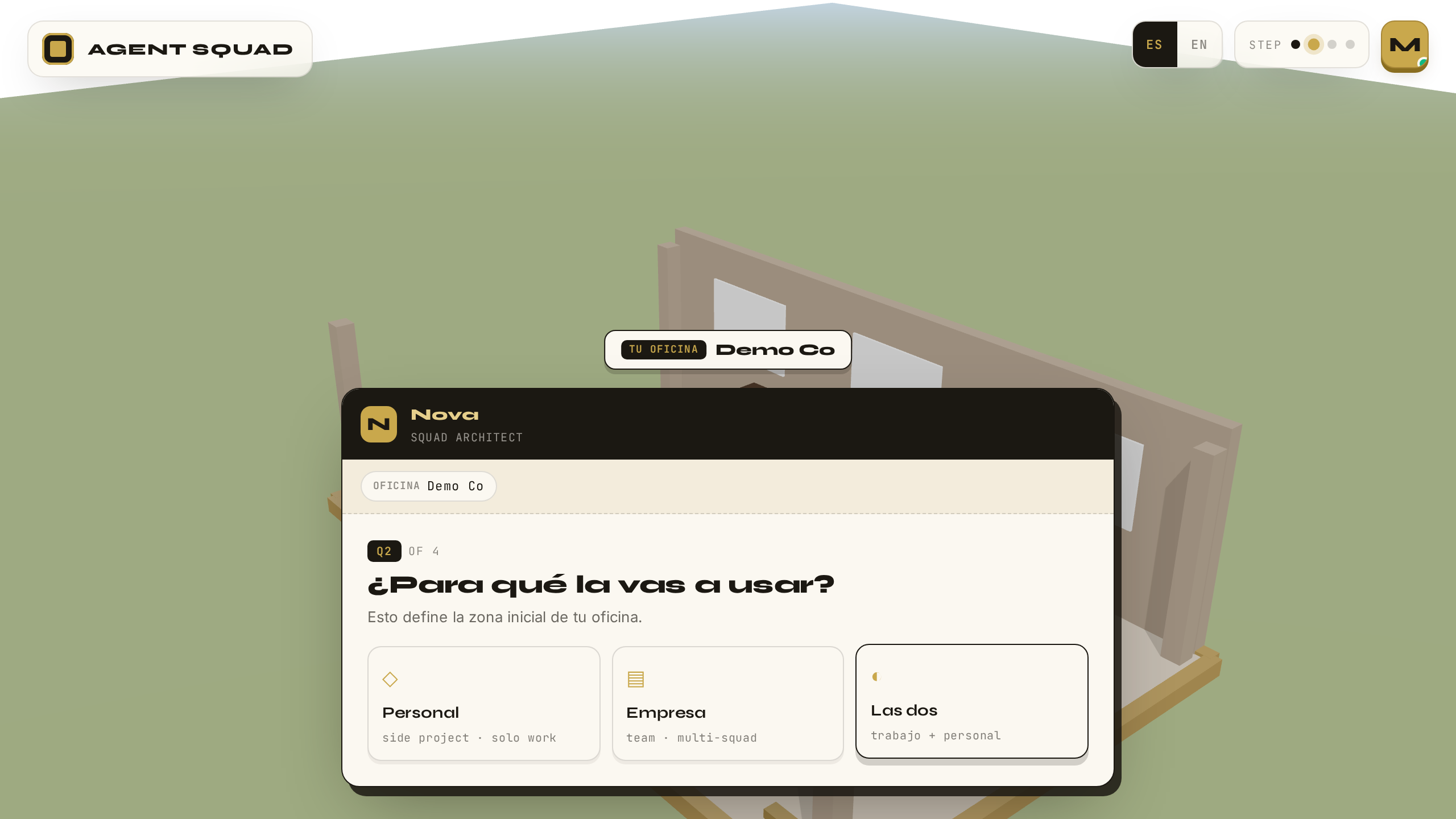
Elige para qué usarás tu oficina: trabajo, proyecto personal, exploración. Choose what you will use your office for: work, a personal project, exploration.

Onboarding Q2 — uso principal
VERIFICADOVERIFIED
Qué pasa por detrásBehind the scenes

Cada respuesta se persiste en el perfil del usuario en InsForge (profile.app_state), siempre vía endpoint server-side — el navegador nunca escribe directo a la base de datos.

Each answer is persisted to the user's profile in InsForge (profile.app_state), always through a server-side endpoint — the browser never writes directly to the database.

11

Onboarding — Q3: objetivoOnboarding — Q3: goal

● PRODUCTIVO● PRODUCTION

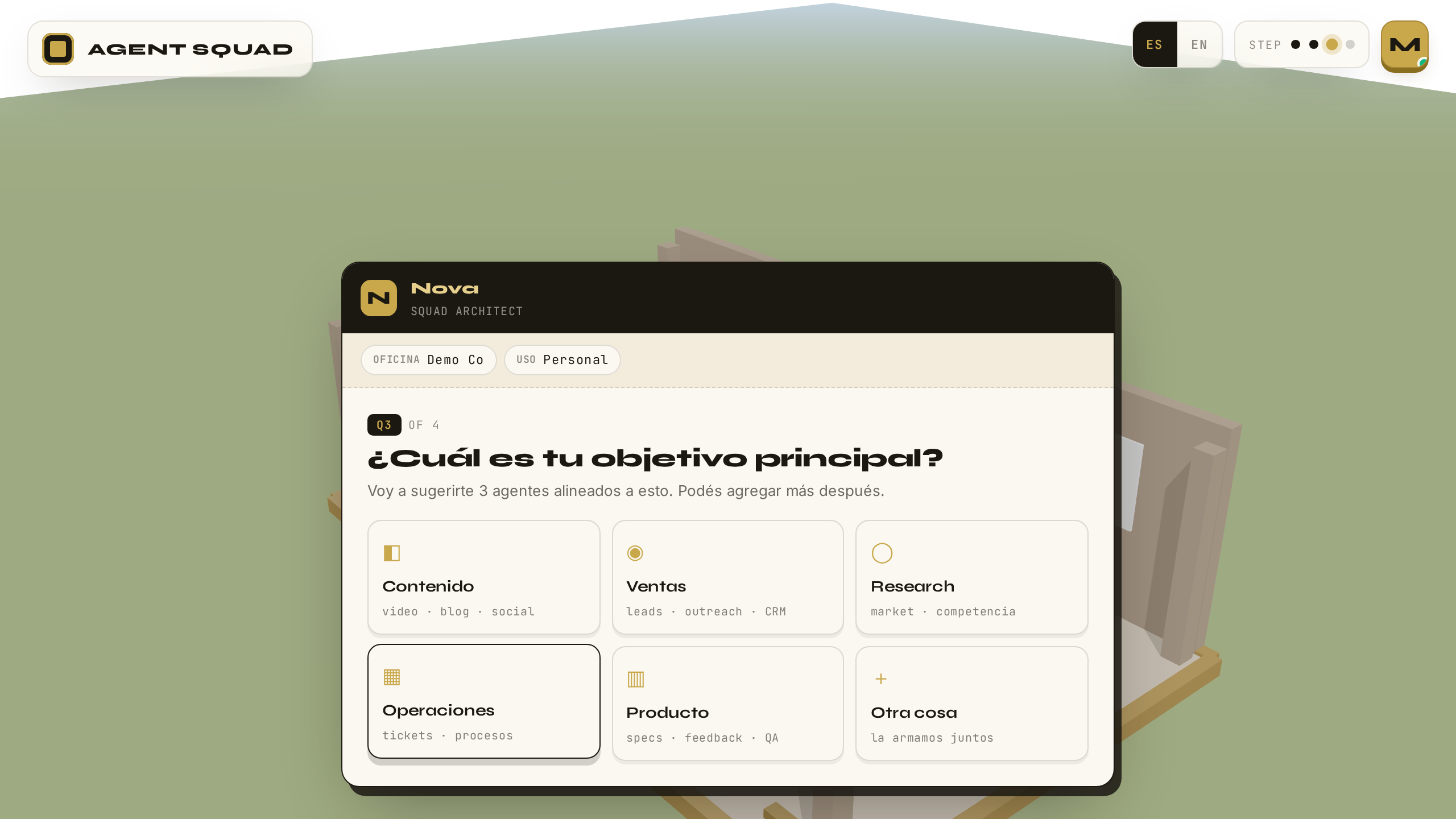
Elige tu objetivo principal: qué quieres que este equipo logre por ti. Pick your main goal: what you want this team to achieve for you.

Onboarding Q3 — objetivo
VERIFICADOVERIFIED
Qué pasa por detrásBehind the scenes

El objetivo que eliges aquí no es decorativo: es el insumo del que se deriva el squad que la app te propondrá dos pantallas más adelante (paso 13).

The goal you pick here is not decorative: it is the input from which the squad the app proposes two screens later (step 13) is derived.

12

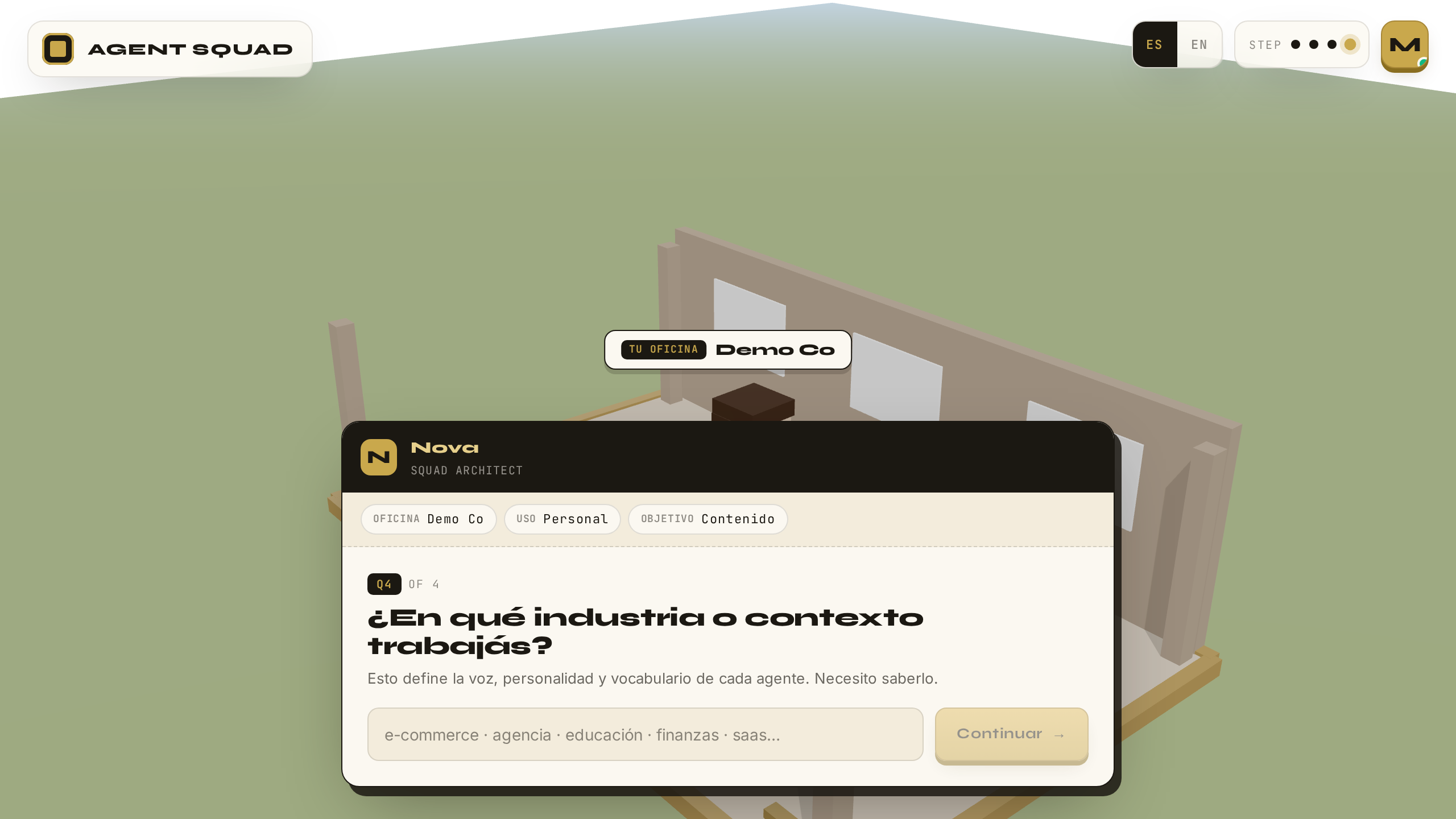
Onboarding — Q4: industriaOnboarding — Q4: industry

● PRODUCTIVO● PRODUCTION

Indica tu industria y cierra el cuestionario. Select your industry and close the questionnaire.

Onboarding Q4 — industria
VERIFICADOVERIFIED
Qué pasa por detrásBehind the scenes

Al completar la cuarta respuesta, el flag onboarding_completed se marca en el perfil y habilita el resto de la app. Sin ese flag, las rutas internas redirigen de vuelta al onboarding.

On completing the fourth answer, the onboarding_completed flag is set on the profile and unlocks the rest of the app. Without that flag, internal routes redirect back to onboarding.

13

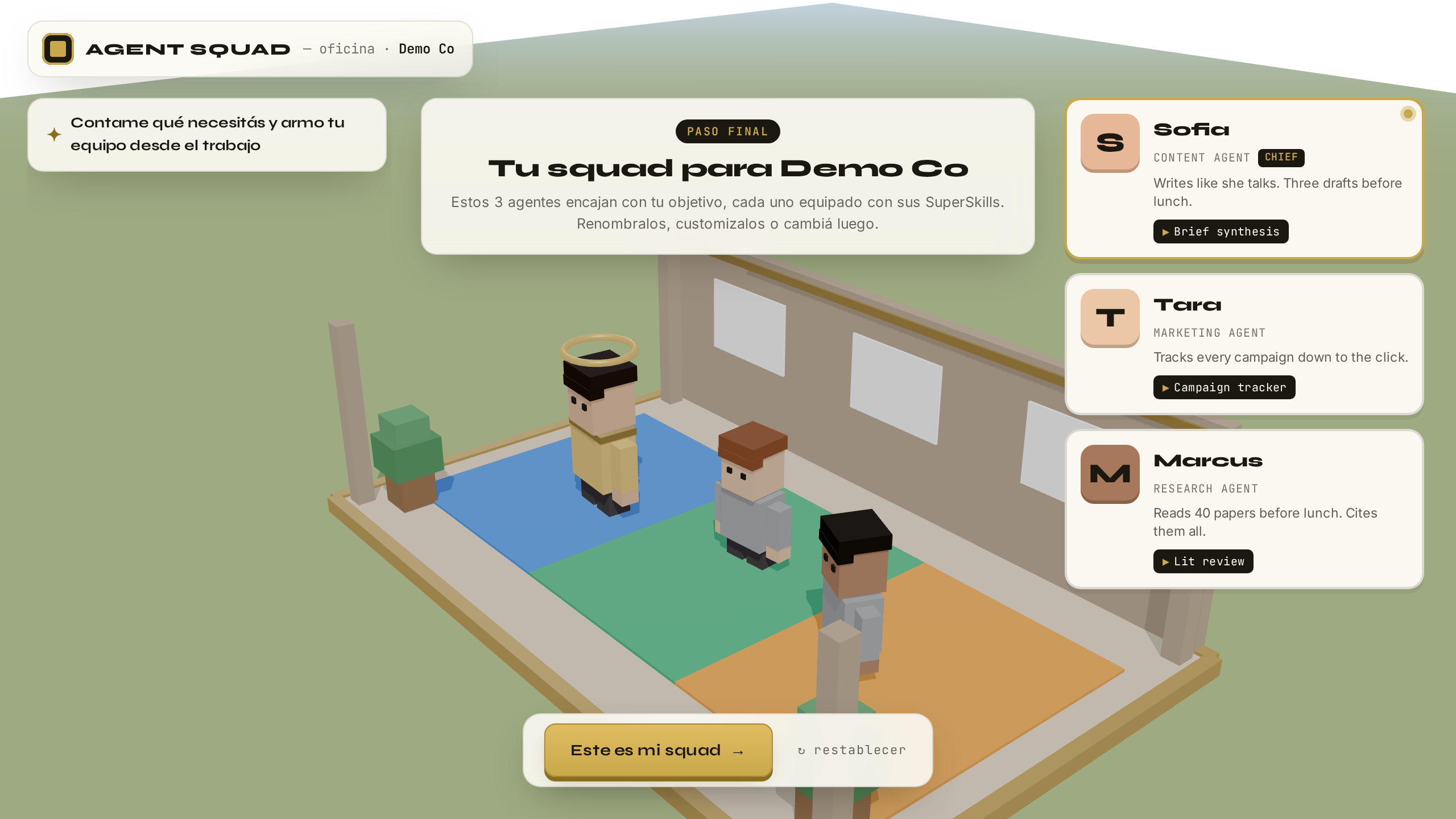
Squad Proposal — 3 agentesSquad Proposal — 3 agents

● PRODUCTIVO● PRODUCTION

La app te propone un squad de 3 agentes adaptado a tu objetivo. Revísalo e instálalo. The app proposes a 3-agent squad tailored to your goal. Review it and install it.

Squad Proposal con 3 agentes
VERIFICADOVERIFIED
Qué pasa por detrásBehind the scenes

El squad propuesto se deriva del objetivo elegido mediante plantillas curadas; "Instalar" guarda el roster en tu perfil. ¿Qué es un agente aquí? Una ficha de identidad — nombre, rol, especialidad — sin ningún programa ni servidor propio detrás. El trabajo real vive en las recetas del motor (PlanTemplates — planos de trabajo predefinidos y probados): cada receta define sus pasos y qué agente firma cada uno; cuando hay trabajo, tu agente es quien aparece haciéndolo. Como en un restaurante: sumar un cocinero al organigrama no construye otra cocina.

The proposed squad is derived from your chosen goal via curated templates; "Install" saves the roster to your profile. What is an agent here? An identity card — name, role, specialty — with no program or server of its own behind it. The real work lives in the engine's recipes (PlanTemplates — predefined, tested work blueprints): each recipe defines its steps and which agent signs each one; when work happens, your agent is the one shown doing it. Like a restaurant: adding a cook to the org chart doesn't build a second kitchen.

CAPÍTULO 3CHAPTER 3

La oficinaThe office

PASOS 14–15STEPS 14–15
14

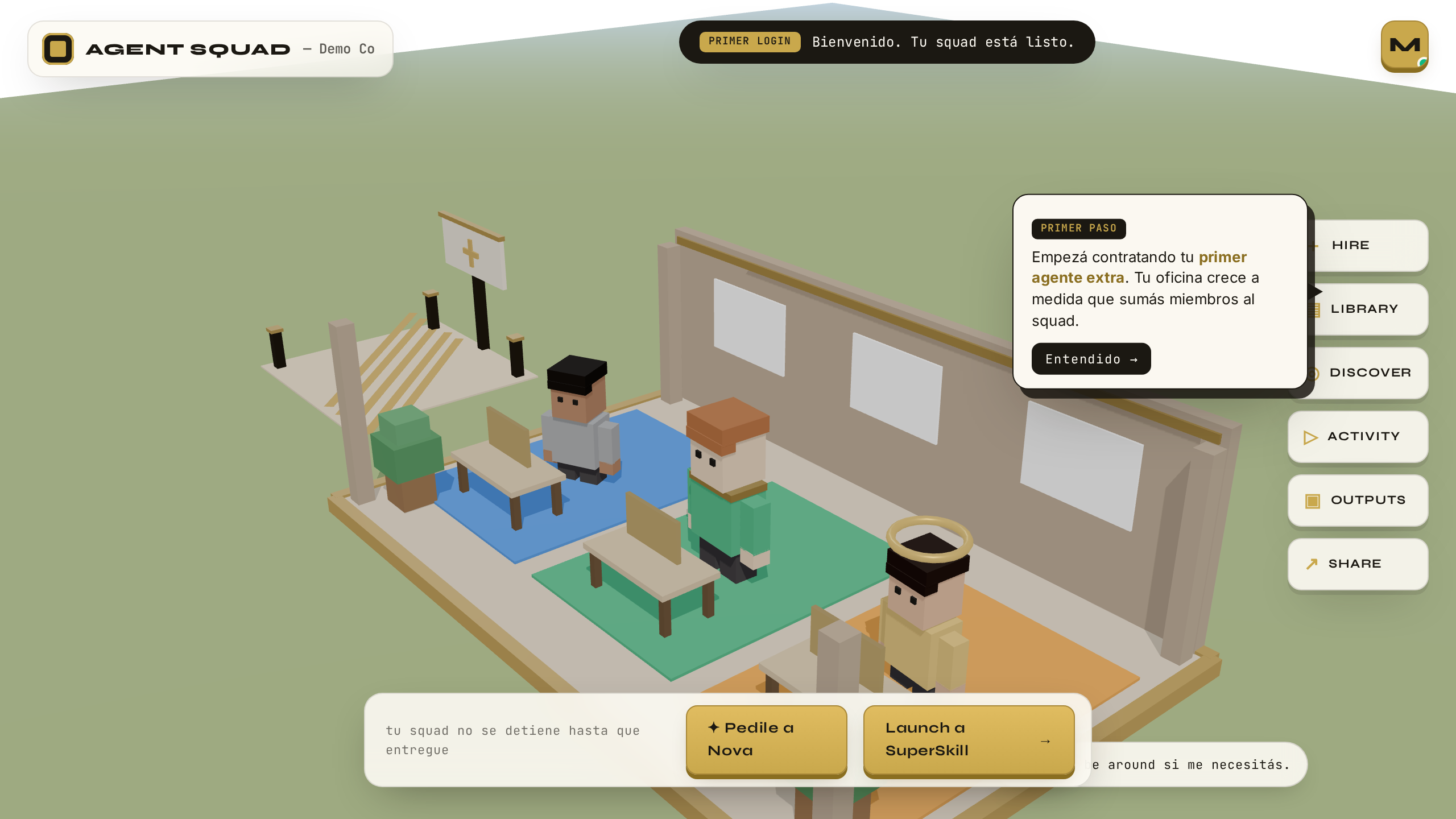
Oficina — primera vez (tutorial)Office — first time (tutorial)

● PRODUCTIVO● PRODUCTION

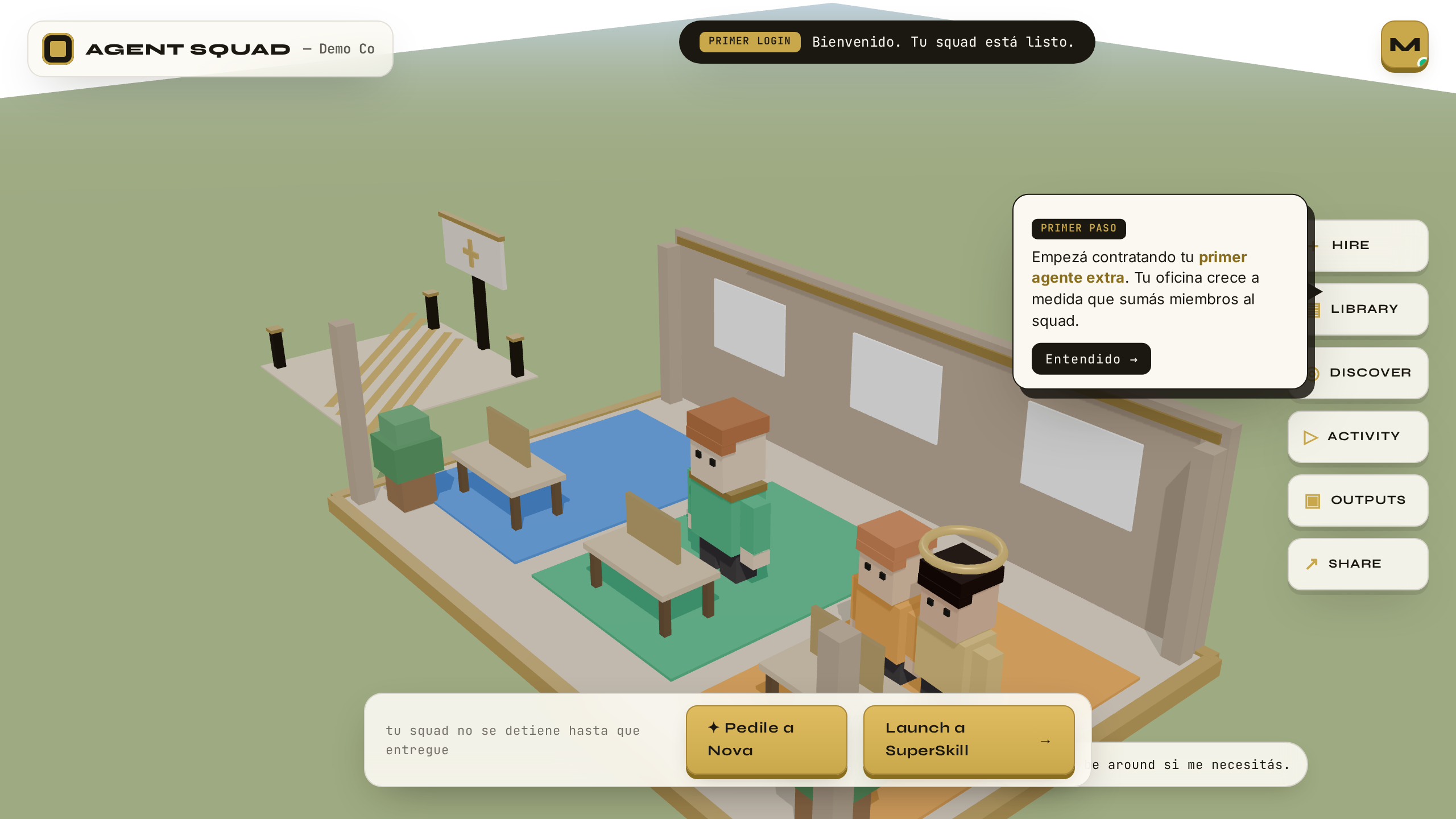
Entra a tu oficina 3D por primera vez. El tutorial te muestra dónde está cada cosa. Enter your 3D office for the first time. The tutorial shows you where everything is.

Oficina 3D — primera vez con tutorial
VERIFICADOVERIFIED
Qué pasa por detrásBehind the scenes

La oficina es una escena 3D cuyas zonas por squad se calculan con un layout puro: una función sin efectos secundarios, testeada con vitest. Mismo input, mismo plano — el render es predecible y verificable como cualquier otra pieza de lógica.

The office is a 3D scene whose per-squad zones are computed by a pure layout: a side-effect-free function, tested with vitest. Same input, same floor plan — the render is as predictable and testable as any other piece of logic.

15

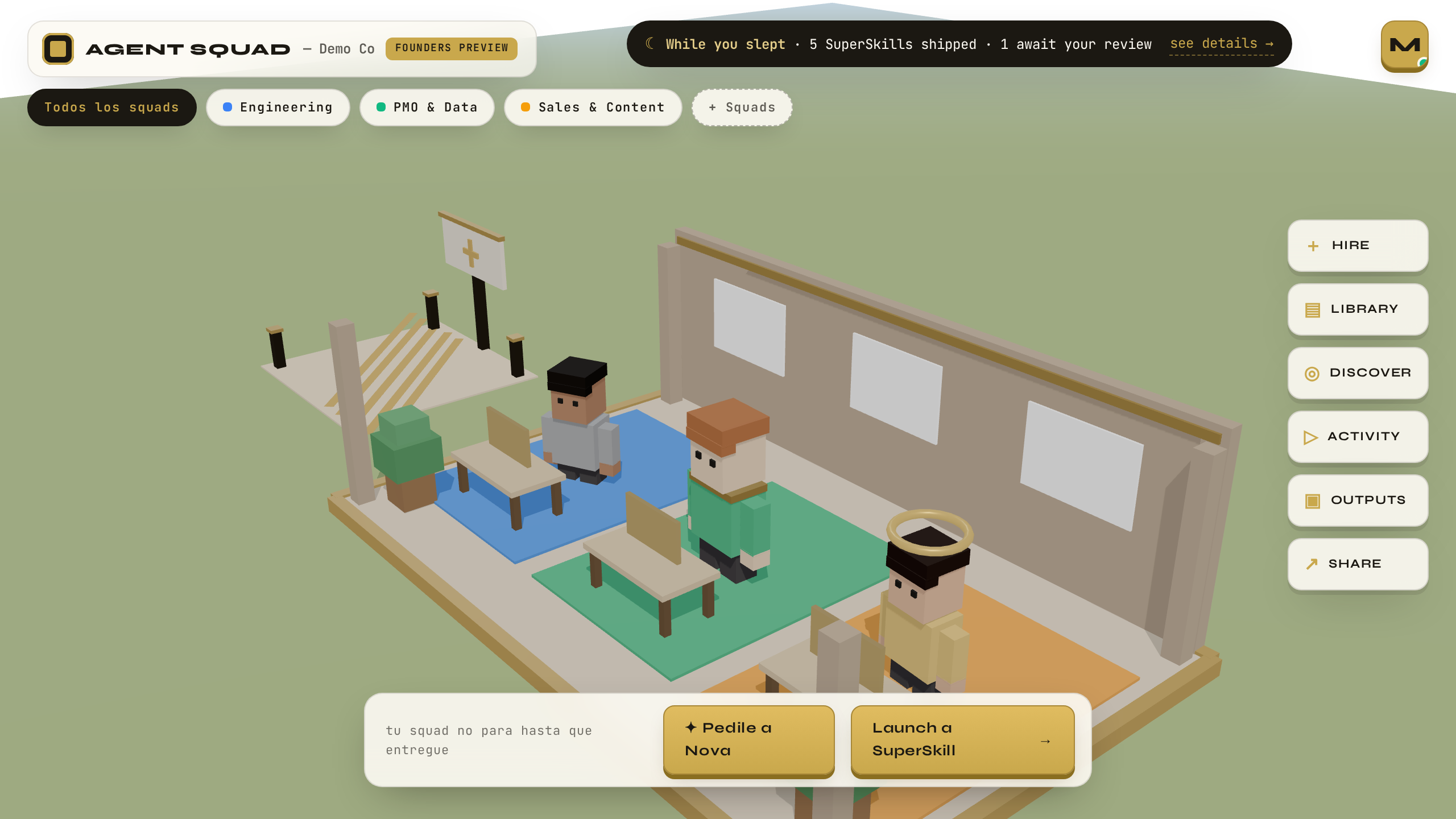
Oficina — estado estableOffice — steady state

● PRODUCTIVO● PRODUCTION

Vuelve a entrar otro día: el recap te dice qué pasó mientras no estabas — qué se entregó y qué espera tu revisión. Come back another day: the recap tells you what happened while you were away — what shipped and what awaits your review.

Oficina — estado estable con recap
VERIFICADOVERIFIED
Qué pasa por detrásBehind the scenes

El recap "While you slept · N shipped · M await review" no es decorado: viene de un endpoint del motor que agrega traces (la bitácora paso a paso de cada ejecución) y artifacts (los entregables que produce un SuperSkill) REALES de las últimas 24 horas. Y es fail-soft: si el motor no responde en 2.5 segundos, la página carga igual — el motor nunca puede tumbar la experiencia.

The "While you slept · N shipped · M await review" recap is not decoration: it comes from an engine endpoint that aggregates REAL traces (the step-by-step log of each execution) and artifacts (the deliverables a SuperSkill produces) from the last 24 hours. And it is fail-soft: if the engine does not answer within 2.5 seconds, the page loads anyway — the engine can never take the experience down.

CAPÍTULO 4CHAPTER 4

Tu vozYour voice

PASO 16STEP 16
16

Briefing — editor de contextoBriefing — context editor

● PRODUCTIVO● PRODUCTION

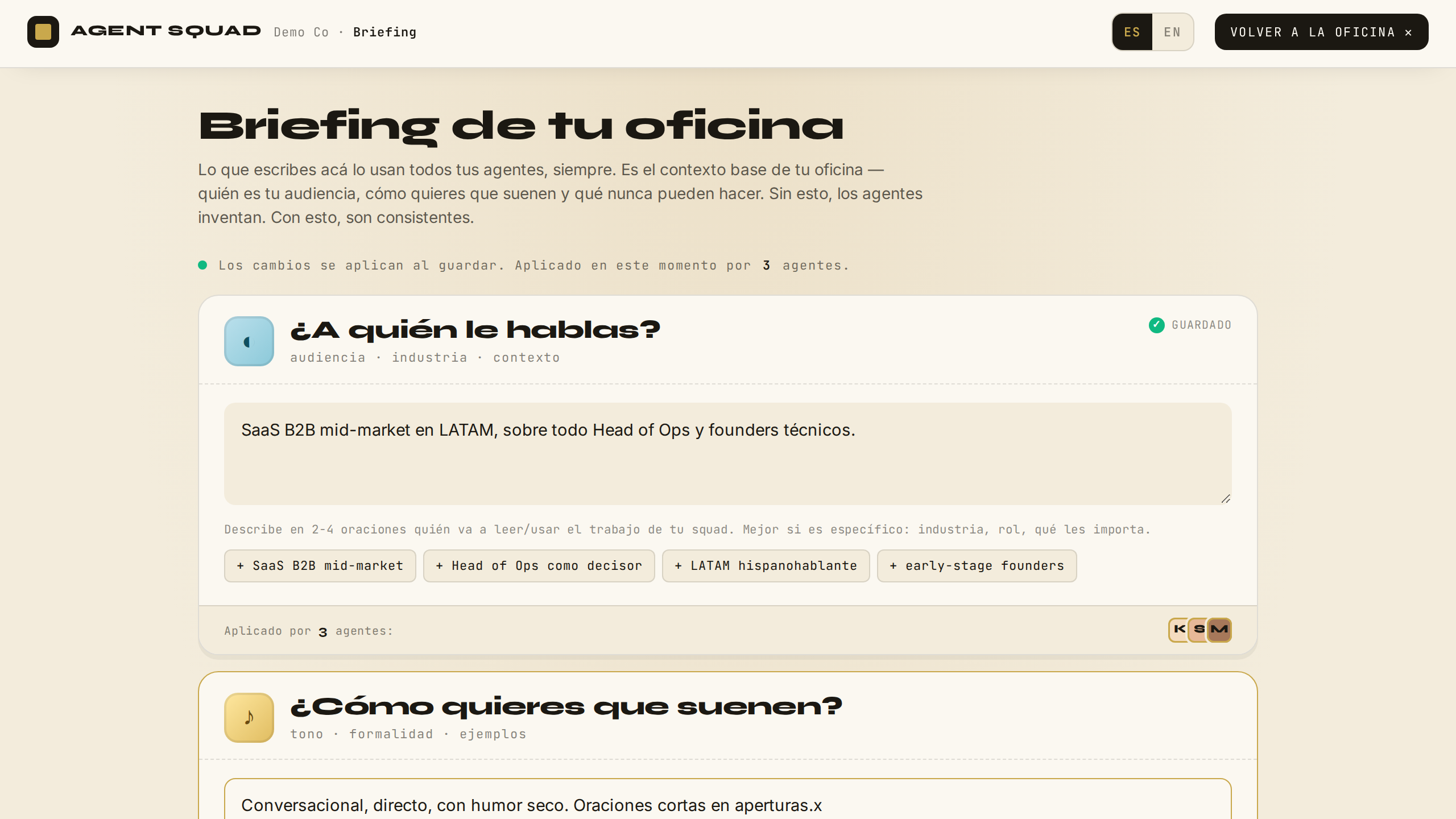
Abre el Briefing y describe tu negocio, tu audiencia y tu tono. Guarda: desde este momento, todo lo que el equipo produzca habla con tu voz. Open the Briefing and describe your business, your audience and your tone. Save: from this moment on, everything the team produces speaks with your voice.

Briefing — editor de contexto
VERIFICADOVERIFIED
Qué pasa por detrásBehind the scenes

Al guardar, un PUT server-side hace que el motor escriba BRIEF.json (la fuente de verdad) y derive AUDIENCE.md de forma determinista, siguiendo el estándar abierto audience.md. La escritura es atómica (tmp + rename) y el workspace_id se valida como UUID antes de tocar el filesystem (anti path-traversal). Tres PlanTemplates llevan un paso s0_audience — una lectura pura de filesystem — que inyecta el bloque OFFICE BRIEFING en el prompt de los agentes redactores. Verificado con prueba de palabra distintiva: lo que escribes aparece en el prompt del agente y moldea el output.

On save, a server-side PUT makes the engine write BRIEF.json (the source of truth) and deterministically derive AUDIENCE.md, following the open audience.md standard. The write is atomic (tmp + rename) and the workspace_id is validated as a UUID before touching the filesystem (anti path-traversal). Three PlanTemplates carry an s0_audience step — a pure filesystem read — that injects the OFFICE BRIEFING block into the composer agents' prompt. Verified with a distinctive-word test: what you write shows up in the agent's prompt and shapes the output.

CAPÍTULO 5CHAPTER 5

Pedir trabajoRequesting work

PASOS 17–19STEPS 17–19
17

SuperSkills — 4 badges LIVESuperSkills — 4 LIVE badges

● PRODUCTIVO● PRODUCTION

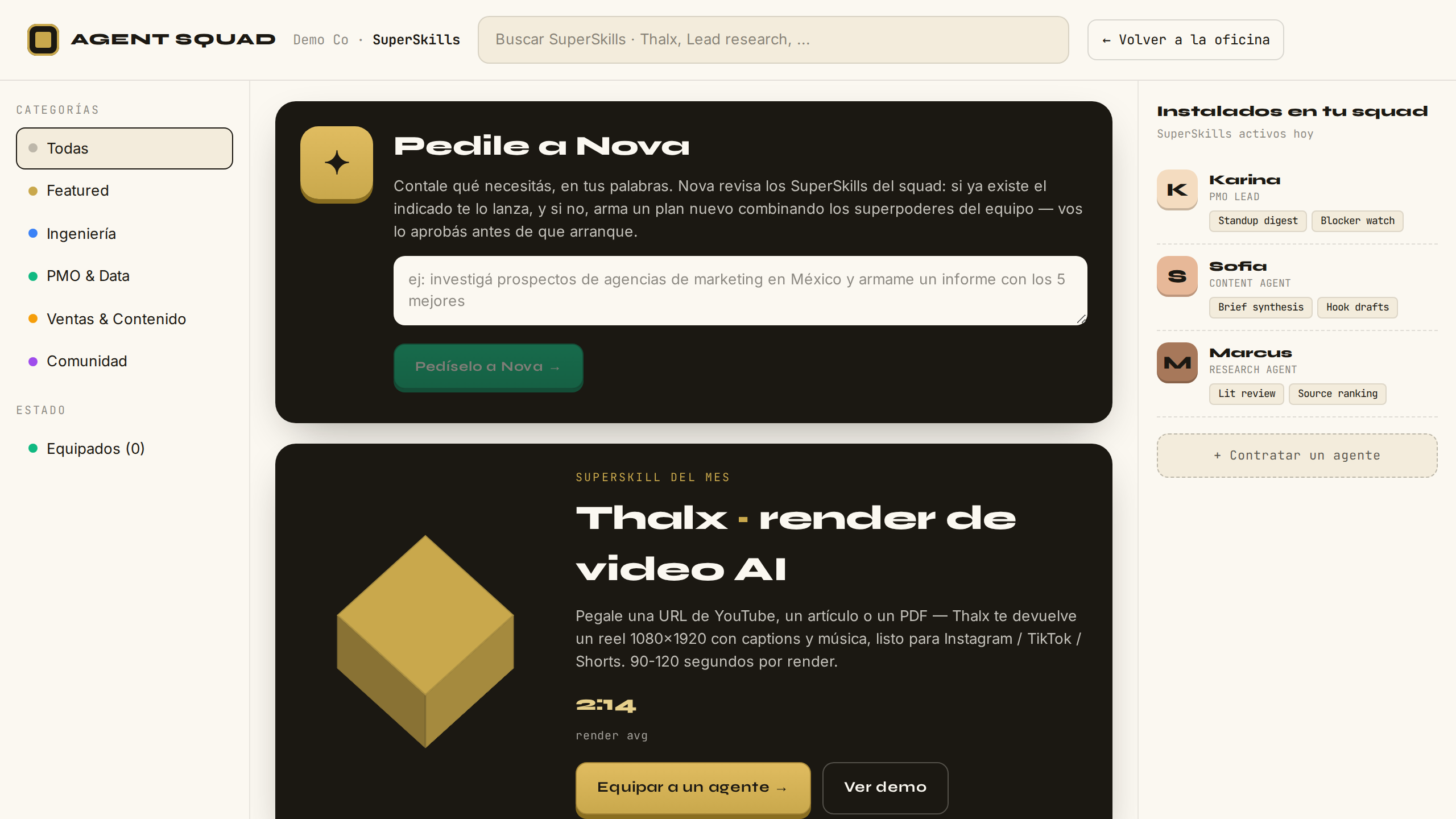
Abre la Library y mira el catálogo: los 4 SuperSkills con badge LIVE están conectados al motor real. Open the Library and browse the catalog: the 4 SuperSkills with a LIVE badge are wired to the real engine.

SuperSkills con 4 badges LIVE
VERIFICADOVERIFIED
Qué pasa por detrásBehind the scenes

Los 4 SuperSkills LIVE forman un catálogo cerrado: el servidor de la app solo acepta lanzar specs que existen en ese catálogo, con inputs tipados y validados. No hay forma de inyectar un SuperSkill arbitrario desde el navegador — el detalle completo de esa validación está en el paso siguiente.

The 4 LIVE SuperSkills form a closed catalog: the app server only accepts launching specs that exist in that catalog, with typed, validated inputs. There is no way to inject an arbitrary SuperSkill from the browser — the full detail of that validation is in the next step.
18

Lanzar un SuperSkill — standup digest realLaunch a SuperSkill — real standup digest

● PRODUCTIVO● PRODUCTION

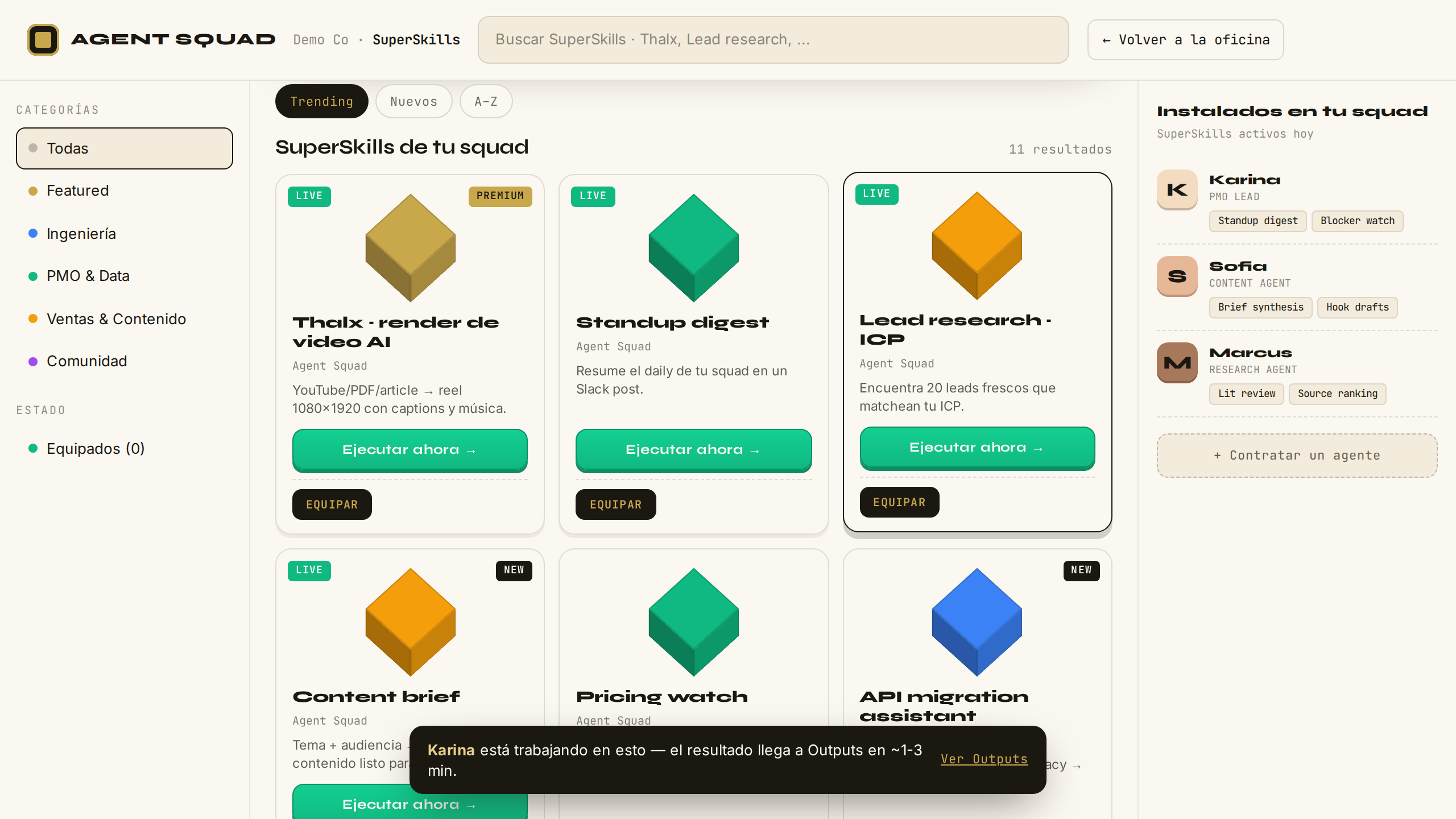
Elige el standup digest, completa el formulario y lánzalo. El trabajo arranca en el motor de verdad. Pick the standup digest, fill in the form and launch it. The work starts on the real engine.

Lanzamiento del SuperSkill standup digest
VERIFICADOVERIFIED
Qué pasa por detrásBehind the scenes

El navegador manda SOLO {workflowId, input}. El servidor valida contra el catálogo cerrado (tipos, longitudes, URLs http/https únicamente, protección anti prototype-pollution) y construye el Intent completo del lado del servidor (el Intent es la declaración formal del trabajo pedido: qué se quiere, quién lo declara y con qué límites)declared_by es tu email normalizado al patrón de actores, el workspace y los constraints son constantes del servidor. Va al motor con bearer token. El motor compila el Intent a un Plan (un grafo tipado —DAG— de 8-9 pasos encadenados) y lo ejecuta con Inngest (el runtime de workflows durables: la ejecución sobrevive reinicios). Nada de esto "instala software": declaras una intención y el motor la compila.

The browser sends ONLY {workflowId, input}. The server validates against the closed catalog (types, lengths, http/https URLs only, anti prototype-pollution protection) and builds the full Intent server-side (the Intent is the formal declaration of the requested work: what is wanted, who declares it, and under which limits)declared_by is your email normalized to the actor pattern; workspace and constraints are server constants. It goes to the engine with a bearer token. The engine compiles the Intent into a Plan (a typed graph —DAG— of 8-9 chained steps) and runs it with Inngest (the durable workflow runtime: executions survive restarts). None of this "installs software": you declare an intention and the engine compiles it.

19

Activity — control roomActivity — control room

● PRODUCTIVO● PRODUCTION

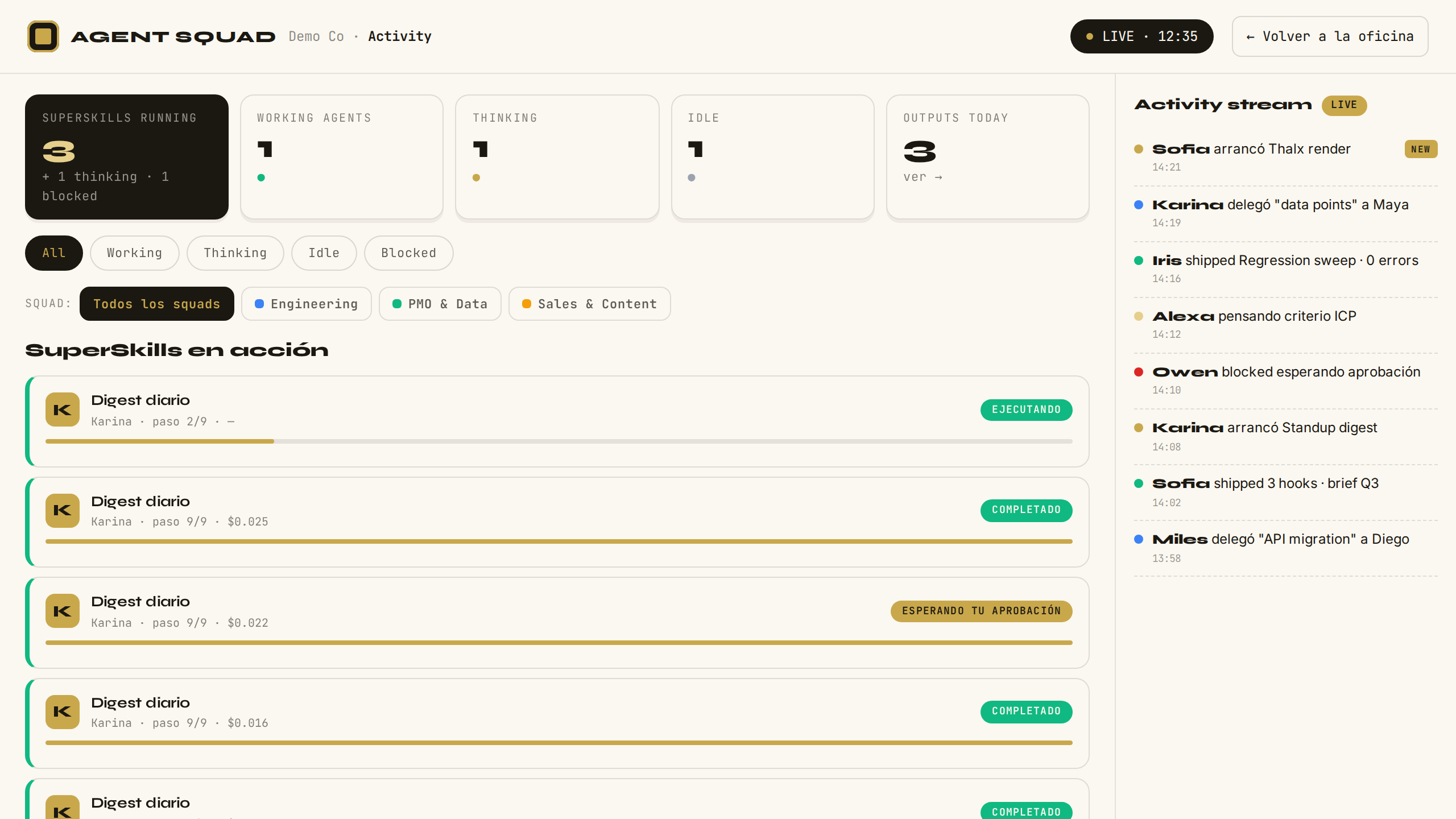
Abre Activity y mira tu SuperSkill correr: paso actual, total de pasos y costo acumulado en dólares, en vivo. Open Activity and watch your SuperSkill run: current step, total steps and accumulated cost in dollars, live.

Activity — control room
VERIFICADOVERIFIED ◐ Sin actividad real aún, se muestran tarjetas de ejemplo marcadas "ejemplo"◐ With no real activity yet, sample cards labeled "example" are shown
Qué pasa por detrásBehind the scenes

Cada tarjeta sale de traces reales del motor: un join a plans más la agregación de step_executions, en 4 queries fijas (sin N+1). Ves paso actual/total y el costo acumulado en dólares — la suma de los costos por paso. Los nombres legibles se mapean por template: un template desconocido jamás filtra su id interno a la pantalla. Pause/Abort todavía no existen (van en v2) — por eso no hay botones que prometan lo que no hay.

Each card comes from real engine traces: a join to plans plus an aggregation over step_executions, in 4 fixed queries (no N+1). You see current/total steps and the accumulated cost in dollars — the sum of per-step costs. Human-readable names are mapped per template: an unknown template never leaks its internal id to the screen. Pause/Abort do not exist yet (slated for v2) — which is why there are no buttons promising what is not there.

CAPÍTULO 6CHAPTER 6

DecidirDecide

PASOS 20–21STEPS 20–21
20

Outputs — esperando el digest lanzadoOutputs — awaiting the launched digest

● PRODUCTIVO● PRODUCTION

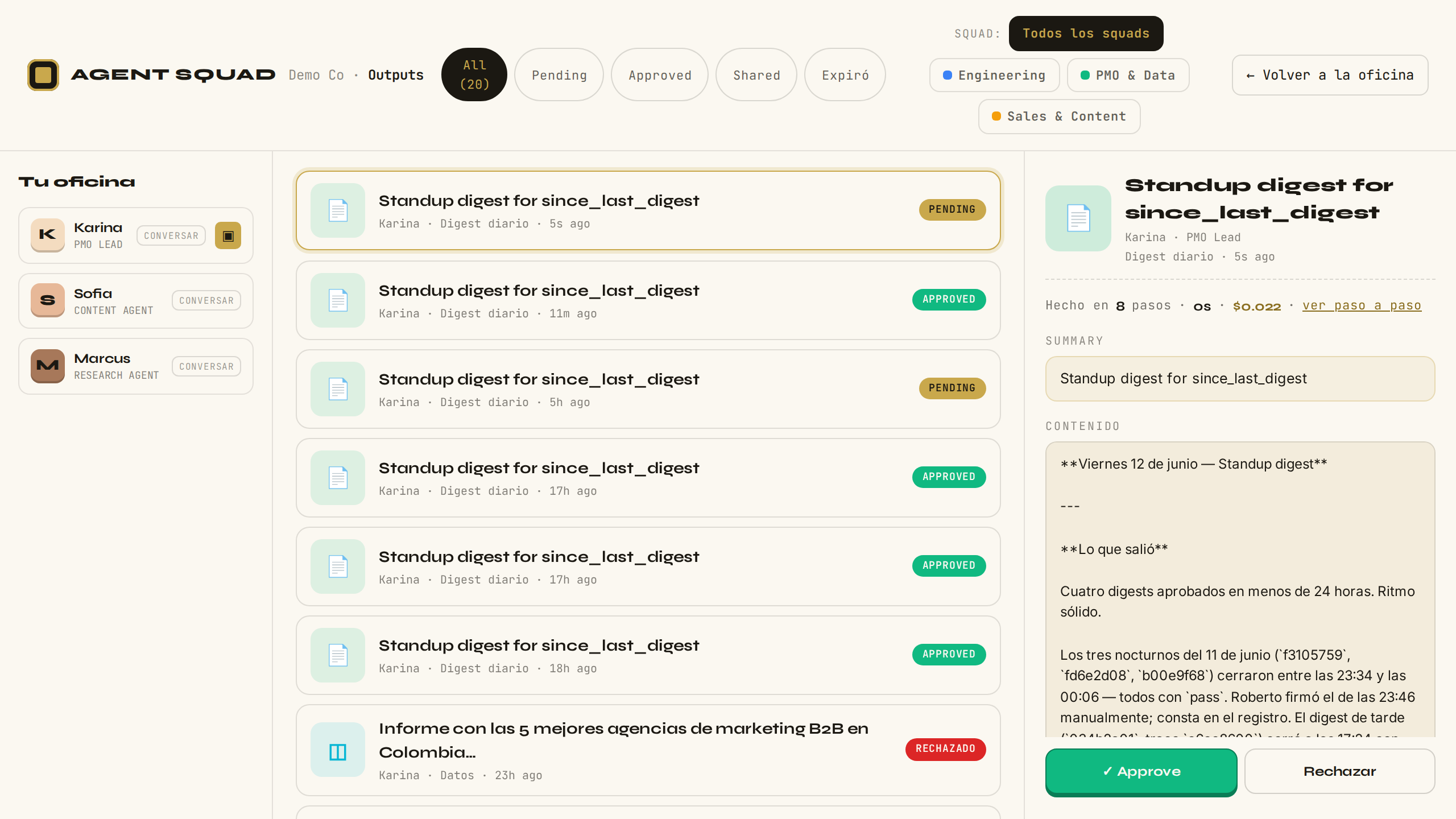
Abre Outputs: el digest que lanzaste aparece como entregable pendiente de tu revisión. Ábrelo y examina cómo se hizo. Open Outputs: the digest you launched shows up as a deliverable pending your review. Open it and inspect how it was made.

Outputs — entregable pendiente
VERIFICADOVERIFIED ◐ Sin actividad real aún, se muestran tarjetas de ejemplo marcadas "ejemplo"◐ With no real activity yet, sample cards labeled "example" are shown
Qué pasa por detrásBehind the scenes

El feed lee artifacts reales del motor, cada uno con su Trace. El detalle muestra tres capas: el contenido; las "memorias aplicadas" — los claims (piezas de memoria estructurada: hechos tipados que el equipo acumula y consulta) que ese run consultó; y "cómo se hizo" — el timeline humanizado del Trace con el costo en dólares de cada paso.

The feed reads real artifacts from the engine, each with its Trace. The detail view shows three layers: the content; the "applied memories" — the claims (pieces of structured memory: typed facts the team accumulates and consults) that run consulted; and "how it was made" — the humanized Trace timeline with each step's cost in dollars.

21

Aprobar output con comentarioApprove output with comment

● PRODUCTIVO● PRODUCTION

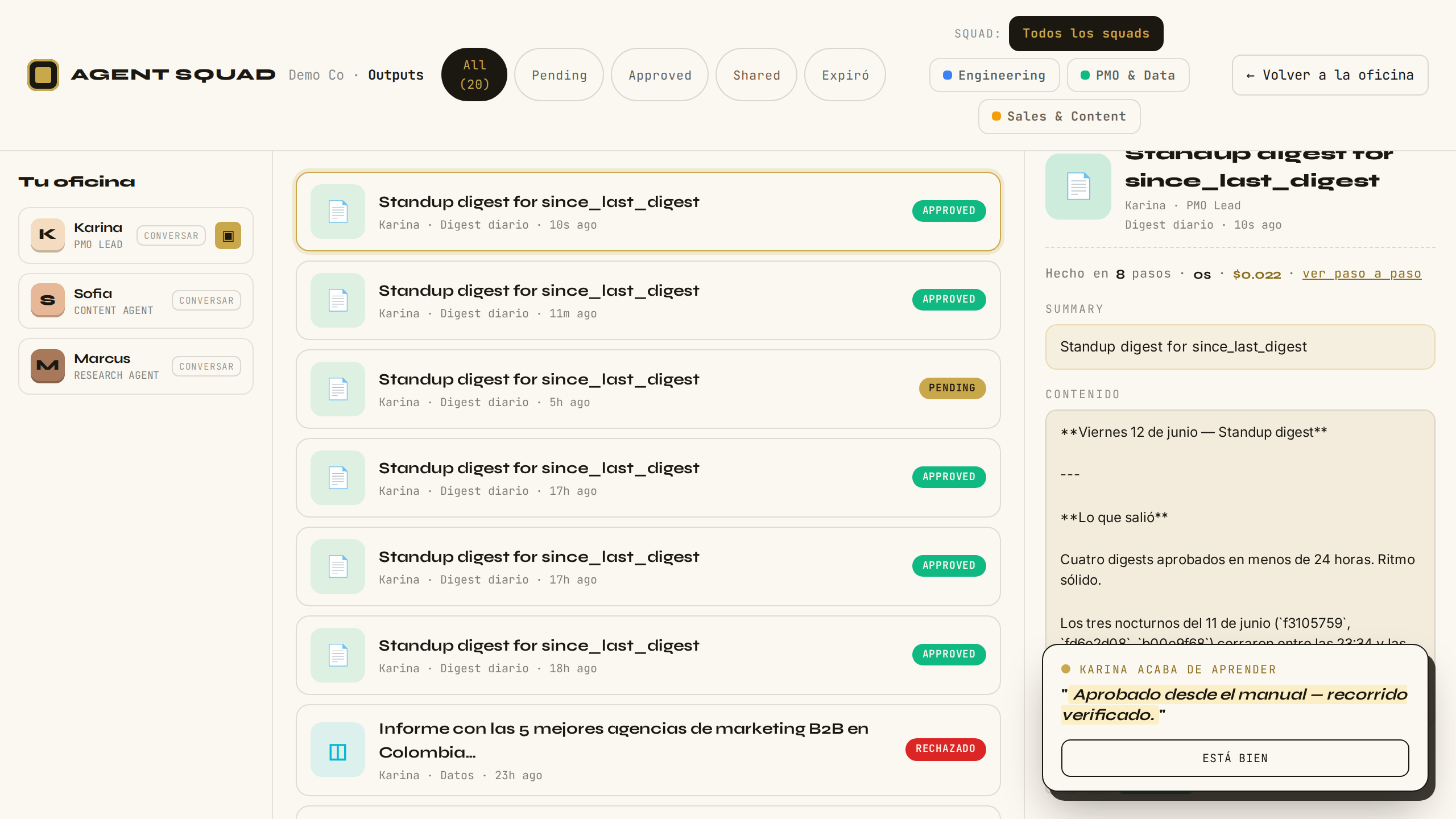
Aprueba el entregable y deja un comentario con tu criterio. Acabas de enseñarle algo al equipo. Approve the deliverable and leave a comment with your judgment. You just taught the team something.

Aprobación de output con comentario
VERIFICADOVERIFIED
Qué pasa por detrásBehind the scenes

Approve/Reject dispara un POST server-side que emite un evento Inngest. Del otro lado hay un gate durable suspendido — un paso (step.waitForEvent) que espera tu decisión hasta 24 horas sin consumir recursos — que resume al instante: el artifact queda aprobado y se escriben ~5 claims tipados (approvedBy, approvalComment…) que los SuperSkills futuros consultan. Si nadie decide en 24 horas, el artifact pasa al estado terminal expired con su claim de expiración — sin huérfanos. Esta es LA tesis del producto: cada decisión humana se vuelve memoria estructurada consultable.

Approve/Reject fires a server-side POST that emits an Inngest event. On the other side sits a suspended durable gate — a step (step.waitForEvent) waiting up to 24 hours for your decision without consuming resources — which resumes instantly: the artifact is approved and ~5 typed claims are written (approvedBy, approvalComment…) that future SuperSkills consult. If nobody decides within 24 hours, the artifact moves to the terminal expired state with its expiry claim — no orphans. This is THE product thesis: every human decision becomes queryable structured memory.

CAPÍTULO 7CHAPTER 7

OrganizarOrganize

PASOS 22–23STEPS 22–23
22

Squads — gestión multi-squadSquads — multi-squad management

● PRODUCTIVO● PRODUCTION

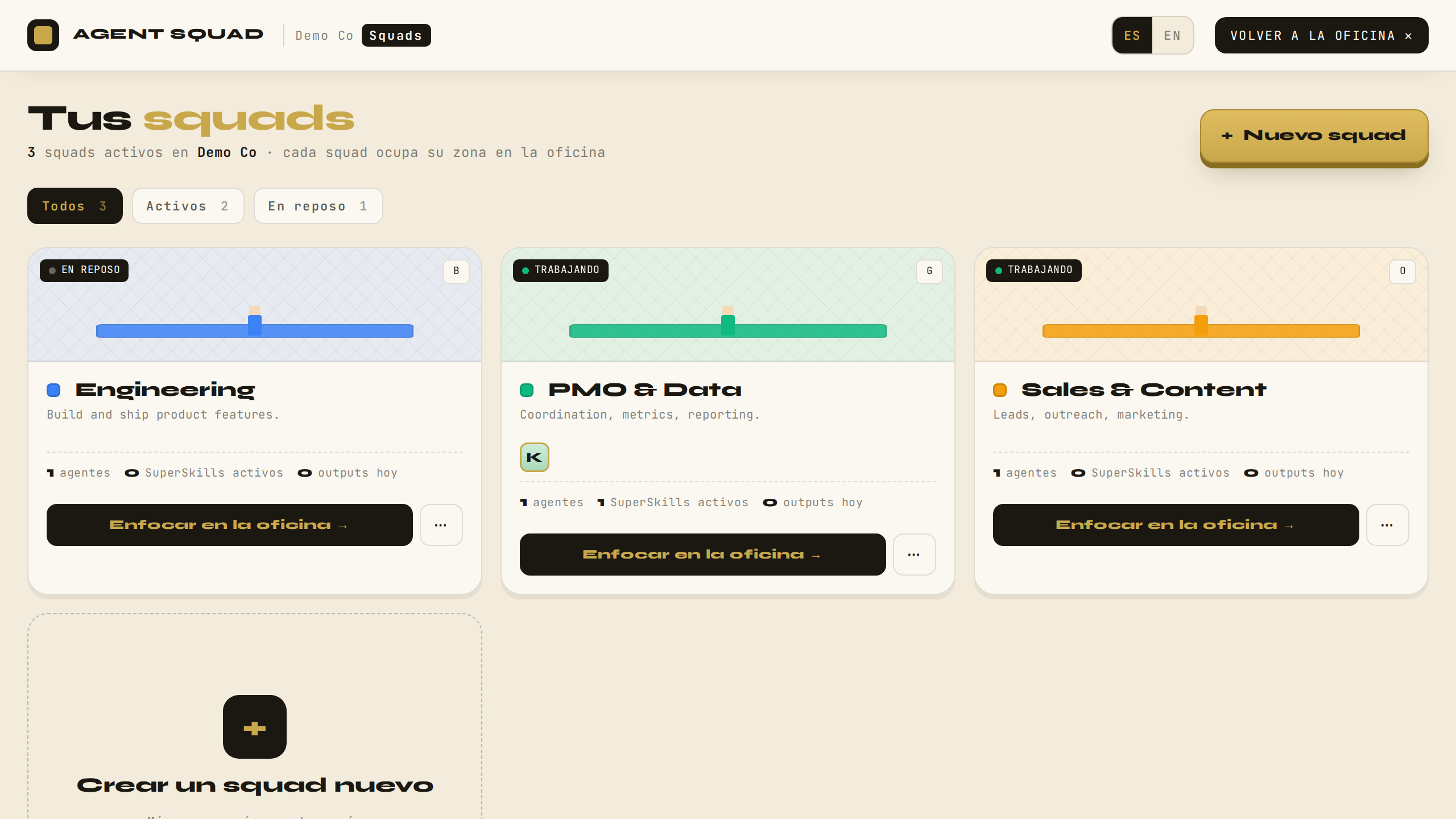
Abre Squads y organiza tu equipo: crea un segundo squad y reparte agentes entre ellos. Open Squads and organize your team: create a second squad and distribute agents between them.

Gestión multi-squad
VERIFICADOVERIFIED ● Sincronizado al perfil — multi-dispositivo verificado en vivo● Synced to the profile — multi-device verified live
Qué pasa por detrásBehind the scenes

El estado multi-squad se guarda en el perfil del usuario: tus squads te siguen a cualquier navegador o dispositivo. Por detrás, el navegador conserva una copia local como cache (si el perfil aún no sincronizó, se usa la copia local; si tampoco existe, se deriva del roster), y cada cambio se escribe al perfil en orden — nunca dos escrituras en paralelo que puedan pisarse. El servidor re-valida el contenido en cada escritura: datos con forma inválida o basura extra no persisten. Las zonas 3D se recalculan del mismo layout puro del paso 14, y crear un squad dispara la animación de construcción en la oficina.

Multi-squad state is stored in the user profile: your squads follow you to any browser or device. Under the hood the browser keeps a local copy as cache (if the profile never synced, the local copy is used; failing that, squads are derived from the roster), and every change is written to the profile in order — never two parallel writes that could clobber each other. The server re-validates the content on every write: malformed shapes or junk fields do not persist. The 3D zones are recomputed from the same pure layout as step 14, and creating a squad triggers the construction animation in the office.

23

Hire — formulario de contrataciónHire — agent creation form

● PRODUCTIVO● PRODUCTION

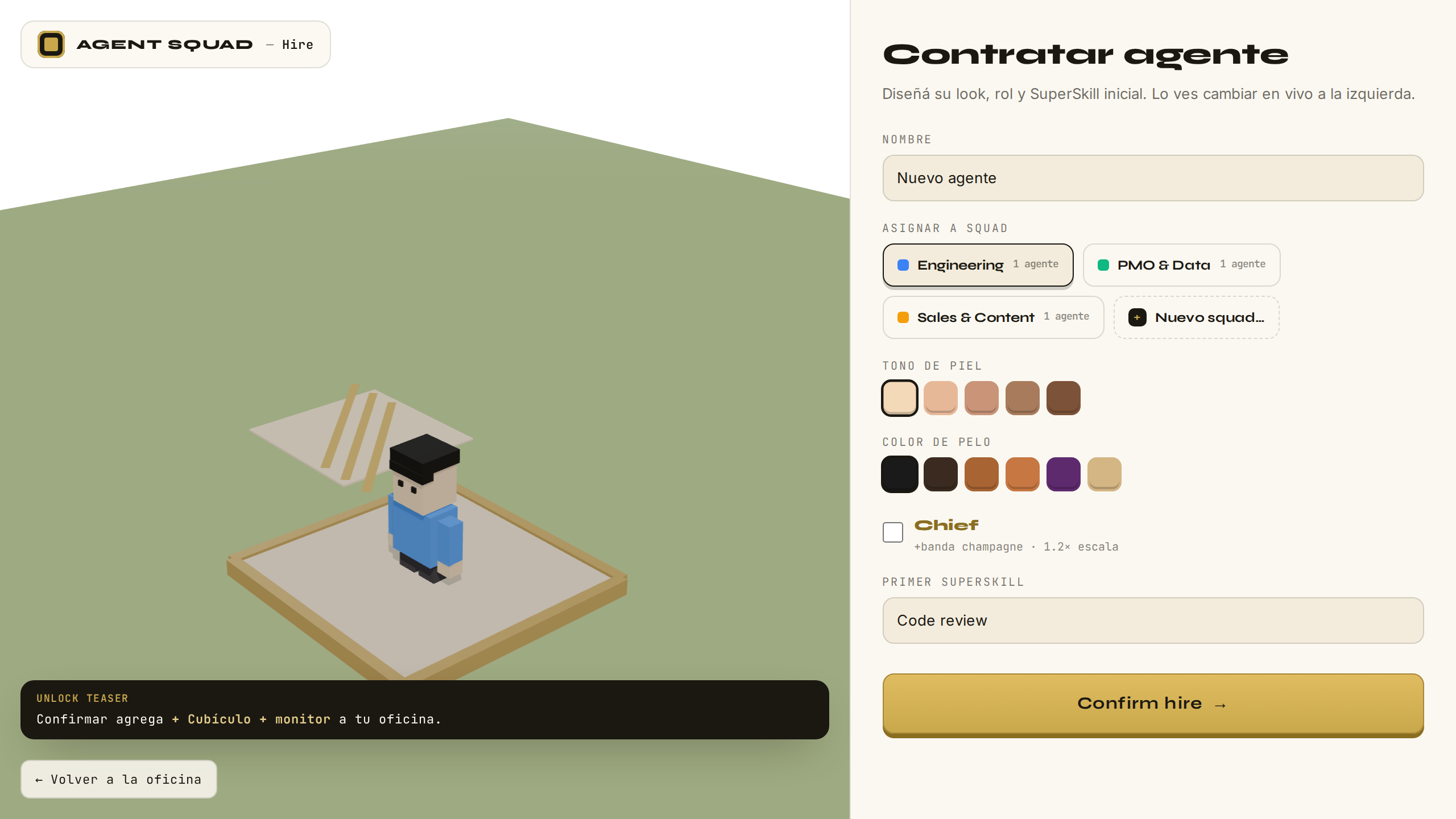
Contrata un agente nuevo: dale nombre, rol y squad, y asígnale su primer SuperSkill. Hire a new agent: give it a name, a role and a squad, and assign its first SuperSkill.

Formulario de contratación de agente
VERIFICADOVERIFIED
Qué pasa por detrásBehind the scenes

El alta agrega el agente al roster en tu perfil de InsForge, con su asignación a squad. El "primer workflow" se asigna, no se ejecuta — la ejecución real siempre pasa por la Library, con todas las validaciones del paso 18. Coherente con el modelo: contratar un agente es ampliar el catálogo de identidades, no levantar infraestructura.

The hire adds the agent to the roster in your InsForge profile, with its squad assignment. The "first workflow" is assigned, not executed — real execution always goes through the Library, with all the validations from step 18. Consistent with the model: hiring an agent extends the catalog of identities, it does not spin up infrastructure.

CAPÍTULO 8CHAPTER 8

Conversar y pedirTalk and ask

PASOS 24–26STEPS 24–26
24

Conversá con tu agenteTalk to your agent

● PRODUCTIVO● PRODUCTION

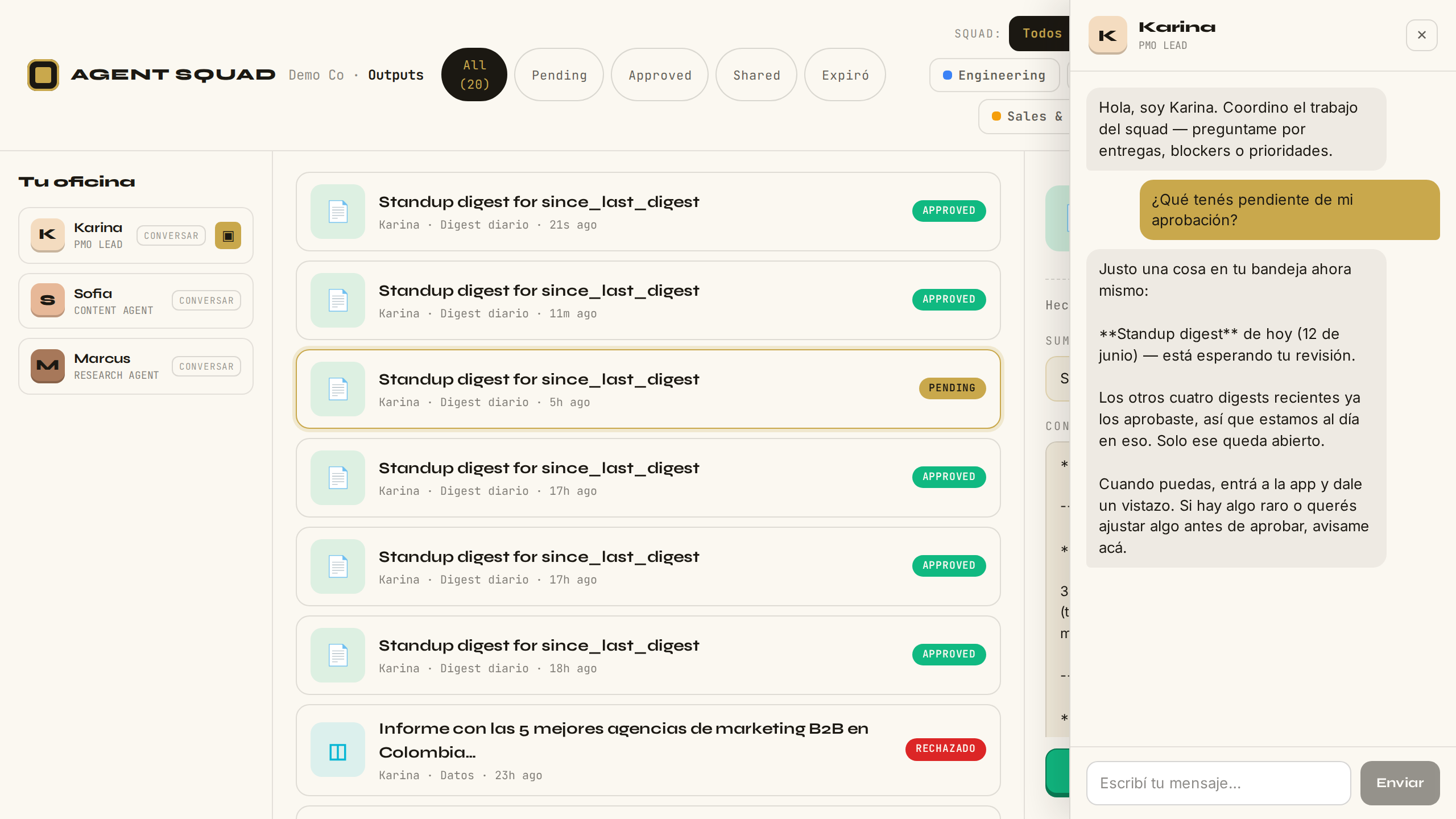
Abre el chat de Karina desde Outputs y preguntale qué tenés pendiente de aprobación. El agente responde en segundos. Open Karina's chat from Outputs and ask her what you have pending approval. The agent responds in seconds.

Chat con Karina desde Outputs
VERIFICADOVERIFIED
Qué pasa por detrásBehind the scenes

Conversar no requiere un proceso esperándote: requiere memoria + un timbre. Tu mensaje enciende una función serverless, que llama al motor, que arma a Karina EN ESE INSTANTE: su persona + tu briefing + sus últimos trabajos con tus comentarios de aprobación + el hilo de la conversación (persistido en el motor). El modelo responde siendo Karina — no porque estuviera despierta, sino porque su memoria lo sabe. Costo marginal $0 (sesión de suscripción). La continuidad de un agente vive en su memoria, no en un proceso.

Talking requires no waiting process: it requires memory and a doorbell. Your message fires a serverless function that calls the engine, which assembles Karina at that instant: her persona + your briefing + her latest work with your approval comments + the conversation thread (persisted in the engine). The model responds as Karina — not because she was awake, but because her memory knows. Marginal cost $0 (subscription session). An agent's continuity lives in memory, not in a process.

25

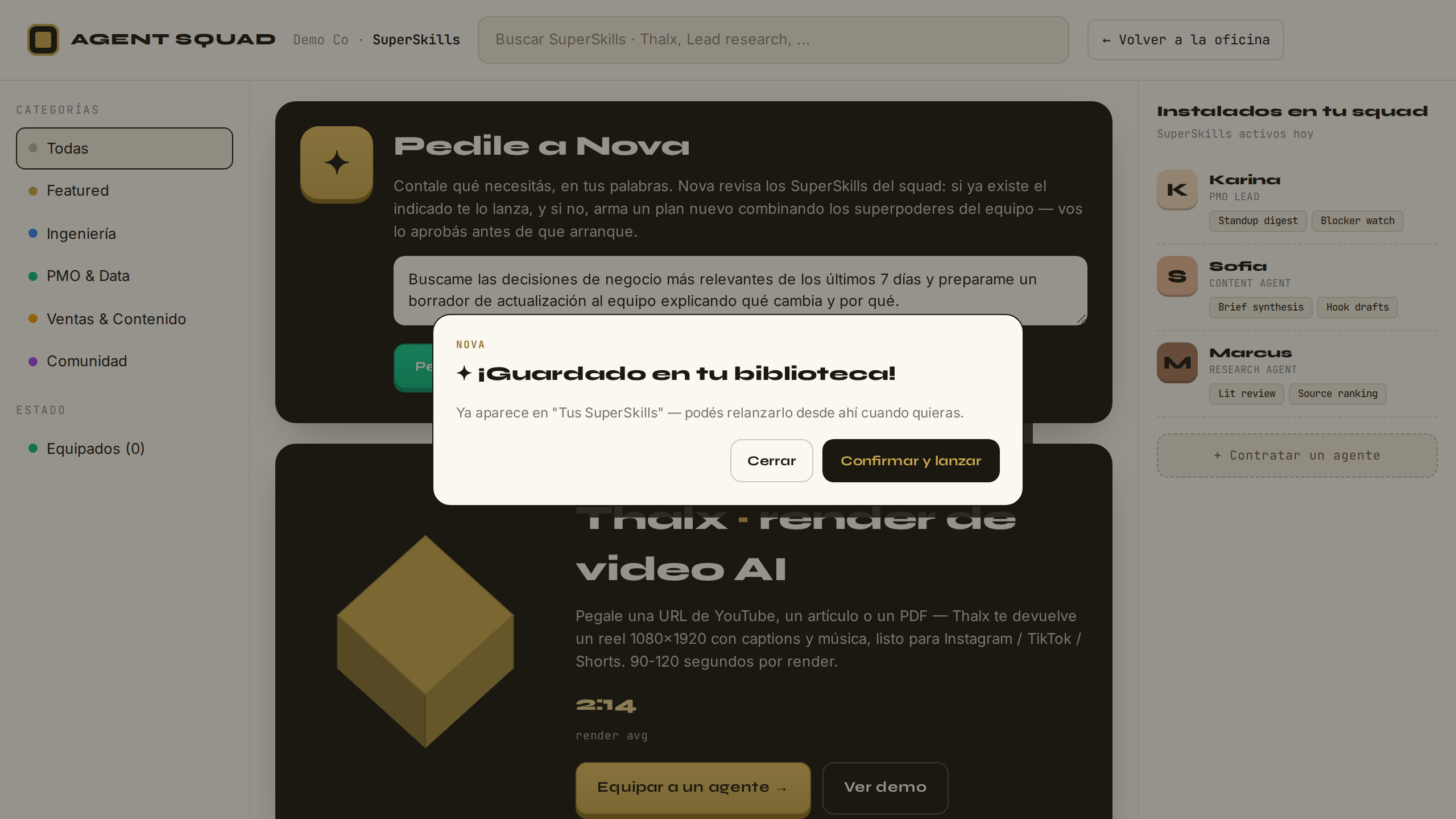
Pedile a Nova — tiene el SuperSkillAsk Nova — she has the SuperSkill

● PRODUCTIVO● PRODUCTION

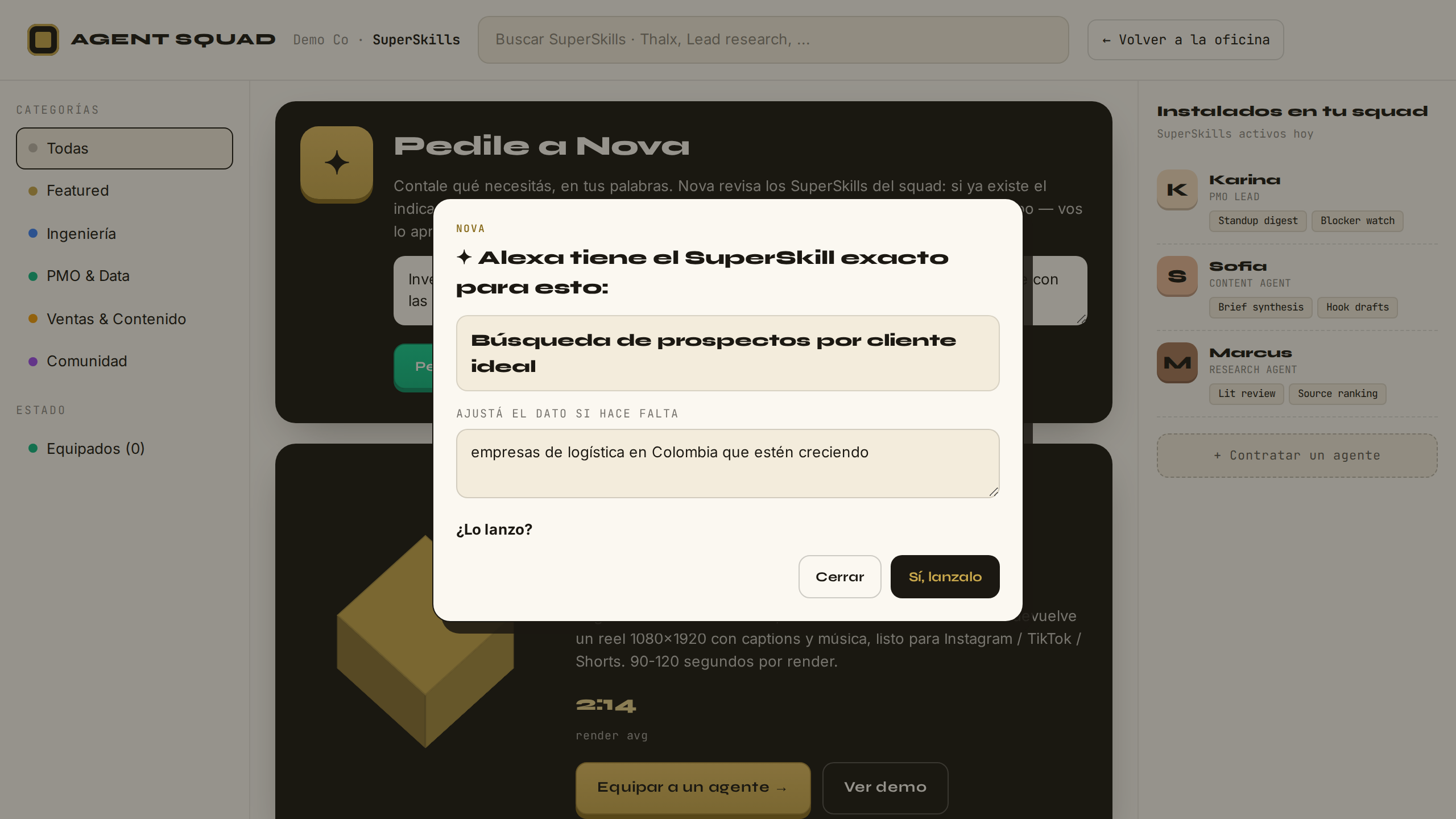
Pedile a Nova que investigue empresas de logística en Colombia. Nova reconoce que es un SuperSkill existente (lead-research), extrae el dato del pedido y ofrece lanzarlo directamente. Ask Nova to research logistics companies in Colombia. Nova recognizes it matches an existing SuperSkill (lead-research), extracts the input from the request, and offers to launch it directly.

Nova reconoce el SuperSkill lead-research
VERIFICADOVERIFIED
Qué pasa por detrásBehind the scenes

El usuario nunca navega un catálogo: le pide a Nova en sus palabras. Una sola consulta al modelo decide entre tres desenlaces. MATCH: el pedido corresponde a un SuperSkill existente — Nova lo reconoce, extrae el dato del pedido (editable) y lo lanza por el flujo normal. El paso 26 muestra el tercer desenlace (COMPONER). Tercer desenlace no capturado: si el pedido requiere una capacidad que no existe, Nova lo dice honesto y el pedido queda registrado — la lista de "no pude" es demanda real que prioriza qué construir.

The user never browses a catalog: they ask Nova in plain language. A single model call decides among three outcomes. MATCH: the request corresponds to an existing SuperSkill — Nova identifies it, extracts the input (editable), and routes it through the normal flow. Step 26 shows the third outcome (COMPOSE). Third outcome not shown: if the request requires a capability that doesn't exist, Nova says so honestly and the request is logged — the "couldn't do it" list is real demand that prioritizes what to build next.

26

Pedile a Nova — compone un plan nuevoAsk Nova — she composes a new plan

● PRODUCTIVO● PRODUCTION

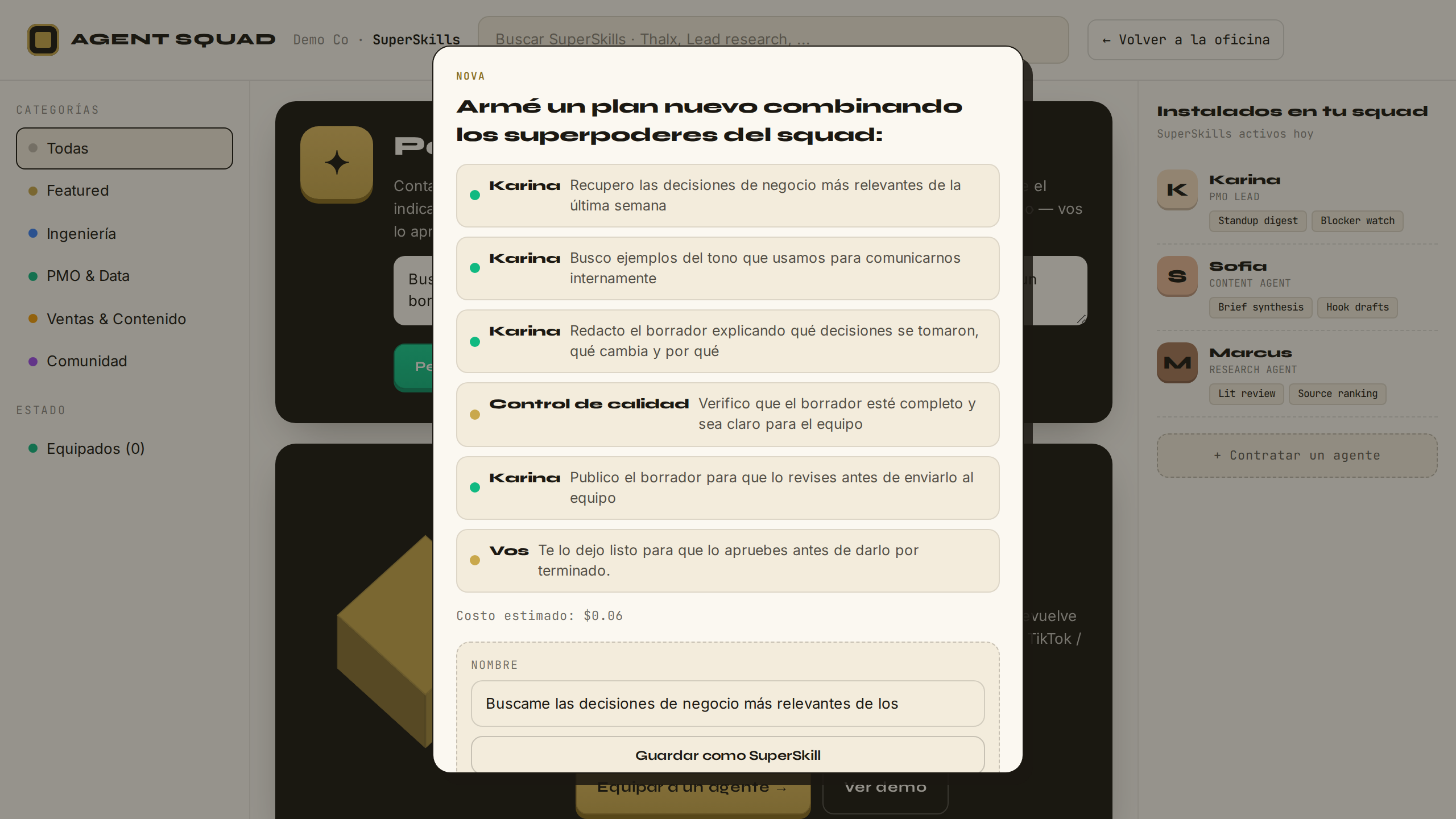
Pedile a Nova que recupere las decisiones de negocio de los últimos 7 días y arme un borrador de actualización para el equipo. No hay SuperSkill exacto — Nova combina operaciones del catálogo y te presenta el plan para aprobar antes de ejecutar. Ask Nova to retrieve business decisions from the last 7 days and draft a team update. There's no exact SuperSkill — Nova combines catalog operations and presents the plan for your approval before executing.

Nova compone un plan nuevo con operaciones del catálogo
VERIFICADOVERIFIED
Qué pasa por detrásBehind the scenes

COMPONER: no hay SuperSkill exacto — Nova arma un plan nuevo combinando SOLO operaciones del catálogo del motor; el servidor lo valida en 4 capas (cada operación debe existir, el grafo no puede tener ciclos, máximo de pasos, y el punto de aprobación humana final es FORZADO por el servidor — el modelo no tiene camino para saltárselo); el costo estimado lo calcula el servidor desde el catálogo (el modelo no puede mentirlo); el usuario ve el plan en humano y decide. Doble control humano siempre: una aprobación al plan, otra al resultado.

COMPOSE: no exact SuperSkill exists — Nova assembles a new plan using ONLY operations from the engine's catalog; the server validates it in 4 layers (each operation must exist, the graph cannot have cycles, step limit, and the final human approval gate is FORCED by the server — the model has no path to skip it); the estimated cost is computed server-side from the catalog (the model cannot lie about it); the user reviews the plan in human language and decides. Double human control always: one approval on the plan, one on the result.

CAPÍTULO 9CHAPTER 9

En vivoLive

PASO 27STEP 27
27

La respuesta se escribe en vivoThe reply writes itself live

● PRODUCTIVO● PRODUCTION

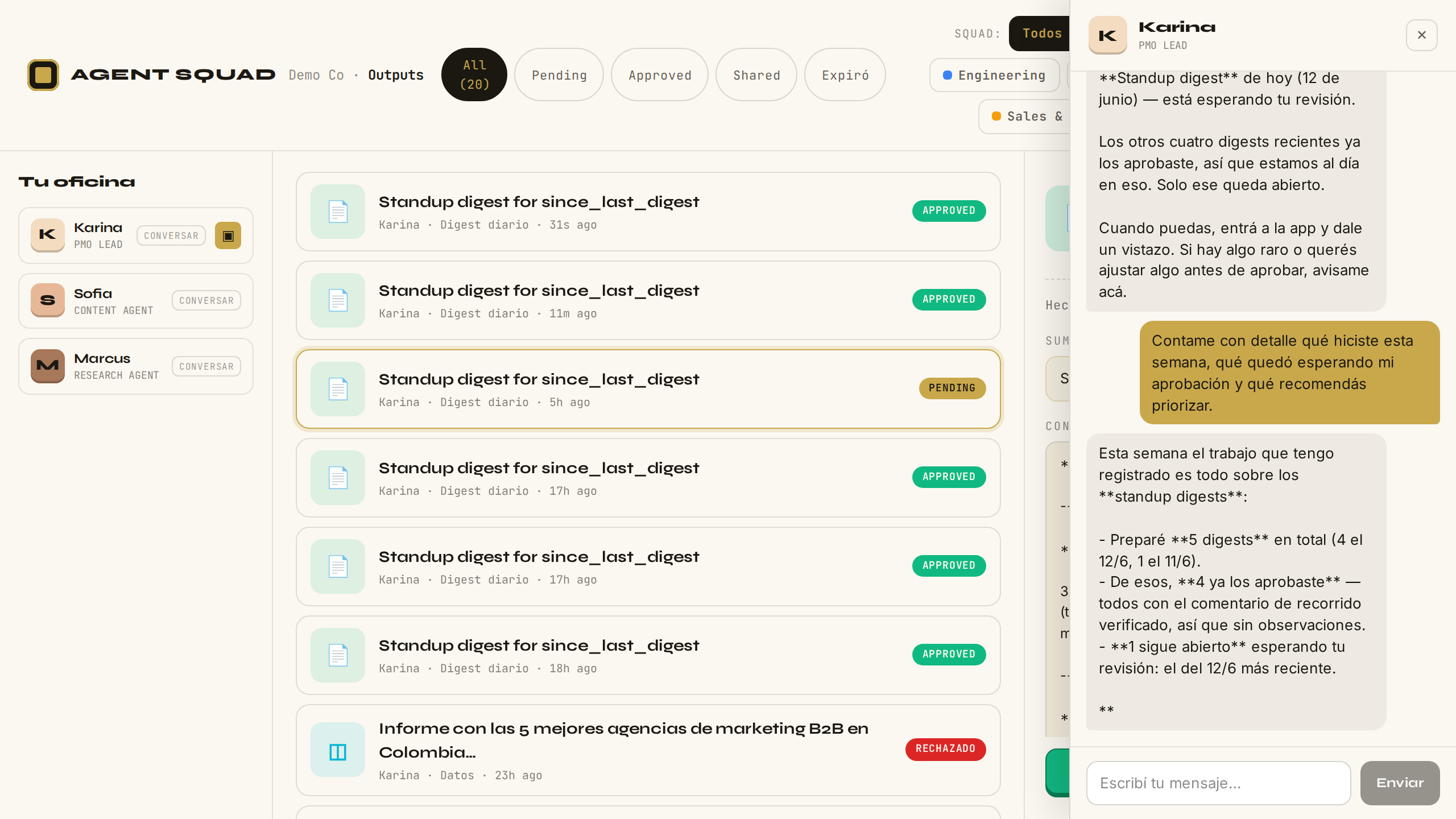
Preguntale a Karina por el detalle de su semana. La respuesta no llega de golpe: se va escribiendo en la burbuja, palabra a palabra, mientras el agente la genera. La captura es a mitad de la escritura — el harness exige ver el texto crecer antes del mensaje final. Ask Karina for the detail of her week. The reply doesn't land all at once: it writes itself into the bubble, word by word, as the agent generates it. The screenshot is mid-write — the harness requires seeing the text grow before the final message.

La respuesta de Karina escribiéndose en vivo en la burbuja
VERIFICADOVERIFIED
Qué pasa por detrásBehind the scenes

El modelo emite tokens; cada uno viaja hasta tu pantalla sin esperar al resto. La cadena completa: el motor lee el stream del modelo línea a línea y lo re-emite como eventos SSE → nginx con buffering apagado para esa ruta → la función serverless de la app NO acumula: re-transmite el body progresivamente → el navegador parsea los eventos y pinta cada delta en la burbuja. Solo el texto final del modelo se emite — el razonamiento interno jamás llega al usuario. Si el stream se corta antes del primer fragmento, la app degrada al camino clásico (una respuesta completa) con un reintento; la reply se persiste en el historial solo si llegó completa — no quedan respuestas a medias.

The model emits tokens; each travels to your screen without waiting for the rest. The full chain: the engine reads the model's stream line by line and re-emits it as SSE events → nginx with buffering off for that route → the app's serverless function does NOT accumulate: it re-transmits the body progressively → the browser parses the events and paints each delta into the bubble. Only the model's final text is emitted — internal reasoning never reaches the user. If the stream breaks before the first fragment, the app degrades to the classic path (one complete reply) with a retry; the reply is persisted to history only if it arrived complete — no half-written replies remain.

CAPÍTULO 10CHAPTER 10

El hilo no se pierdeThe thread survives

PASO 28STEP 28
28

Recargá la página — el hilo sigue ahíReload the page — the thread is still there

● PRODUCTIVO● PRODUCTION

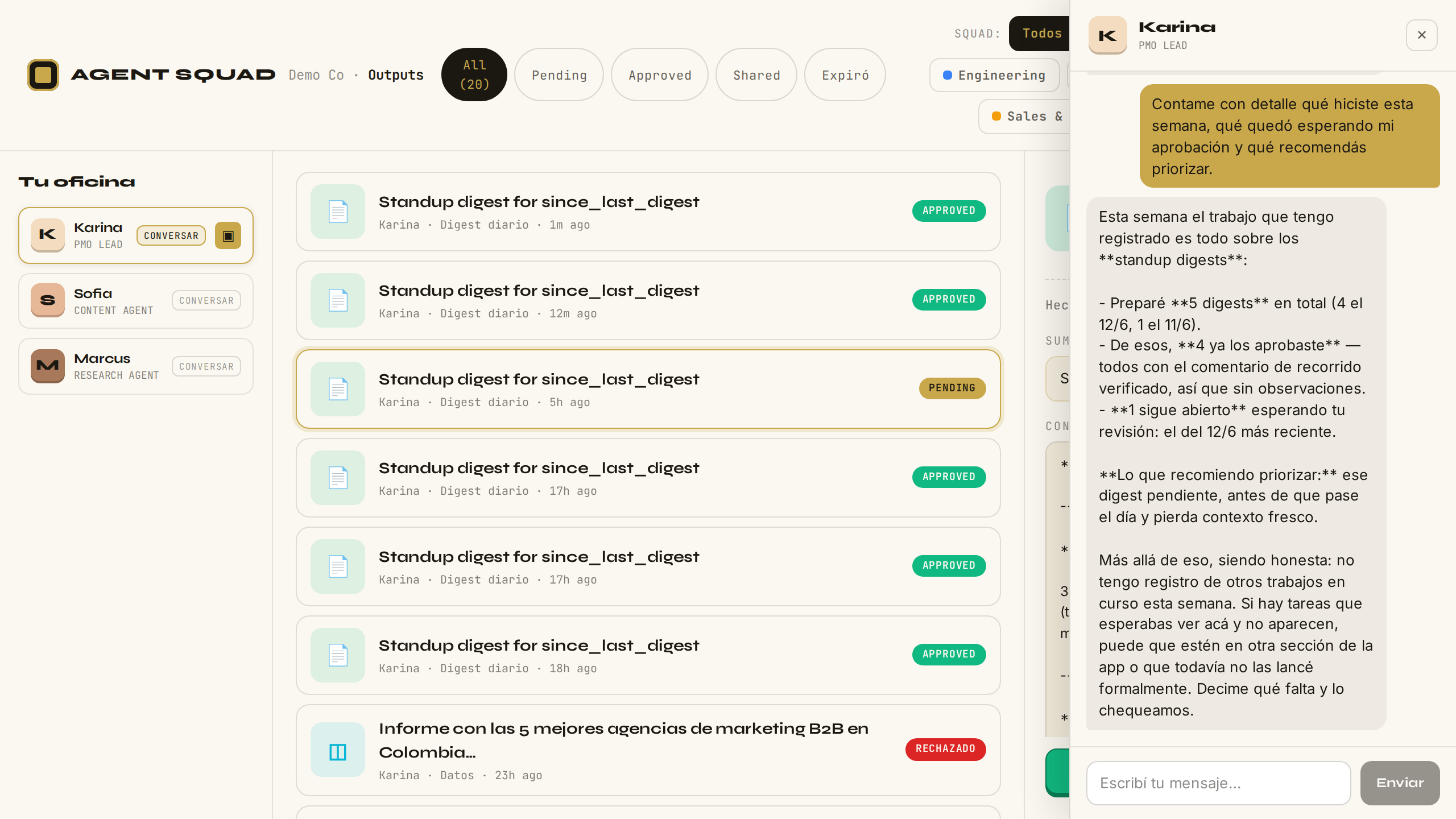
Recargá la página y abrí de nuevo el chat de Karina. Sin enviar nada, la conversación anterior reaparece completa — incluida la pregunta del paso 27 y su respuesta. Karina retoma donde quedaron. Reload the page and open Karina's chat again. Without sending anything, the previous conversation reappears in full — including step 27's question and its reply. Karina picks up where you left off.

El hilo de chat restaurado tras recargar la página
VERIFICADOVERIFIED
Qué pasa por detrásBehind the scenes

El hilo no vive en tu navegador: vive en el motor (Postgres, una tabla de mensajes por conversación). Al abrir el chat con la sesión vacía, la app le pide al motor el último hilo de ese agente y lo restaura. Fail-soft deliberado: si el motor no responde, el chat abre vacío e igual funciona — recuperar historial nunca bloquea conversar. La memoria en curso siempre manda: la restauración jamás pisa una conversación que ya está abierta. Y enviar un mensaje continúa el mismo hilo — por eso el agente retoma el contexto en vez de empezar de cero.

The thread doesn't live in your browser: it lives in the engine (Postgres, one message table per conversation). When the chat opens with an empty session, the app asks the engine for that agent's latest thread and restores it. Deliberately fail-soft: if the engine doesn't answer, the chat opens empty and still works — history recovery never blocks talking. The in-progress memory always wins: restoration never overwrites an open conversation. And sending a message continues the same thread — which is why the agent picks up the context instead of starting over.

CAPÍTULO 11CHAPTER 11

SuperSkills propiosYour own SuperSkills

PASOS 29–31STEPS 29–31
29

Guardá el plan de Nova como SuperSkillSave Nova's plan as a SuperSkill

● PRODUCTIVO● PRODUCTION

Cuando Nova compone un plan que te gusta, no lo pierdas al lanzarlo: ponele un nombre propio y guardalo. Ese plan pasa a ser un SuperSkill tuyo, del workspace, listo para relanzar cuando quieras. When Nova composes a plan you like, don't lose it after launching: give it a name and save it. That plan becomes your own workspace SuperSkill, ready to relaunch whenever you want.

Confirmación de guardado del SuperSkill propio
VERIFICADOVERIFIED
Qué pasa por detrásBehind the scenes

Guardar es promover: el plan compuesto se copia tal cual a un catálogo del workspace en el motor — pero el servidor lo valida OTRA VEZ contra el catálogo de operaciones antes de insertarlo (un plan que dejó de ser válido no entra al catálogo). Guardar dos veces el mismo borrador es imposible: una restricción única en la base lo rechaza, gane quien gane la carrera. El "formulario" del SuperSkill no lo inventa nadie: se deriva mecánicamente de los datos variables que el propio plan declara.

Saving is promoting: the composed plan is copied verbatim to a workspace catalog in the engine — but the server validates it AGAIN against the operations catalog before inserting (a plan that stopped being valid doesn't enter the catalog). Saving the same draft twice is impossible: a unique constraint in the database rejects it, whoever wins the race. The SuperSkill's "form" is invented by no one: it derives mechanically from the variable inputs the plan itself declares.

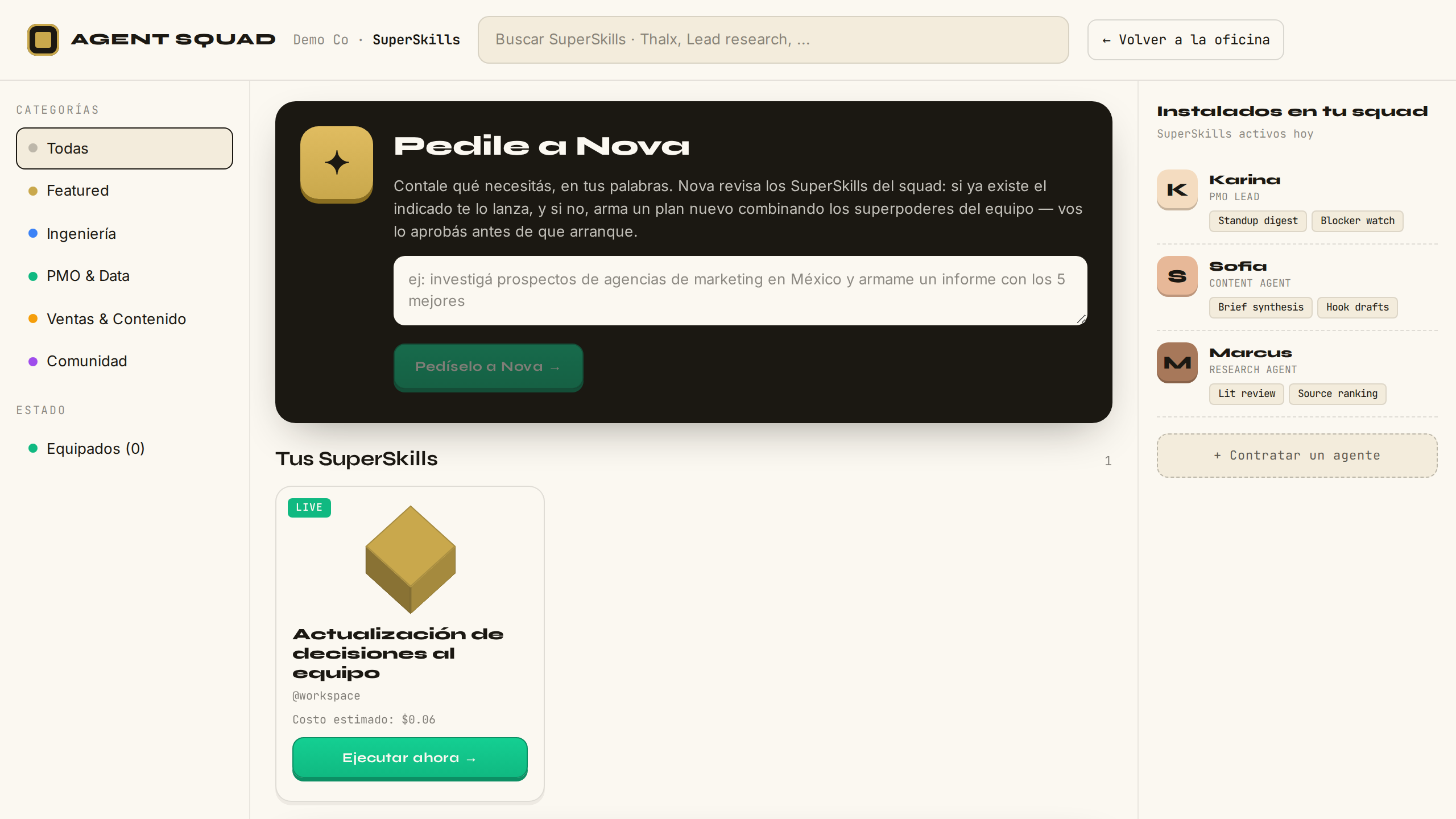
30

Tu library — sección "Tus SuperSkills"Your library — "Your SuperSkills" section

● PRODUCTIVO● PRODUCTION

Volvé a la library: ahora tiene una sección nueva con tus SuperSkills guardados, cada uno con su nombre, su descripción y sus datos. Conviven con los de fábrica. Go back to the library: it now has a new section with your saved SuperSkills, each with its name, description and inputs. They live alongside the factory ones.

Sección Tus SuperSkills en la library
VERIFICADOVERIFIED
Qué pasa por detrásBehind the scenes

La library lee tus SuperSkills activos del motor server-side, fail-soft (si el motor no responde, la library carga igual, sin la sección). Nova también los ve: en pedidos futuros puede reconocer "eso ya lo tenés guardado" y ofrecerte tu SuperSkill en vez de componer de cero. Ese reconocimiento se valida server-side contra la lista real del workspace — el modelo no tiene forma de inventar un SuperSkill que no existe, y lo que se muestra viene de la base, nunca del texto del modelo.

The library reads your active SuperSkills from the engine server-side, fail-soft (if the engine doesn't answer, the library loads anyway, without the section). Nova sees them too: on future requests she can recognize "you already have that saved" and offer your SuperSkill instead of composing from scratch. That recognition is validated server-side against the workspace's real list — the model has no way to invent a SuperSkill that doesn't exist, and what's displayed comes from the database, never from the model's text.

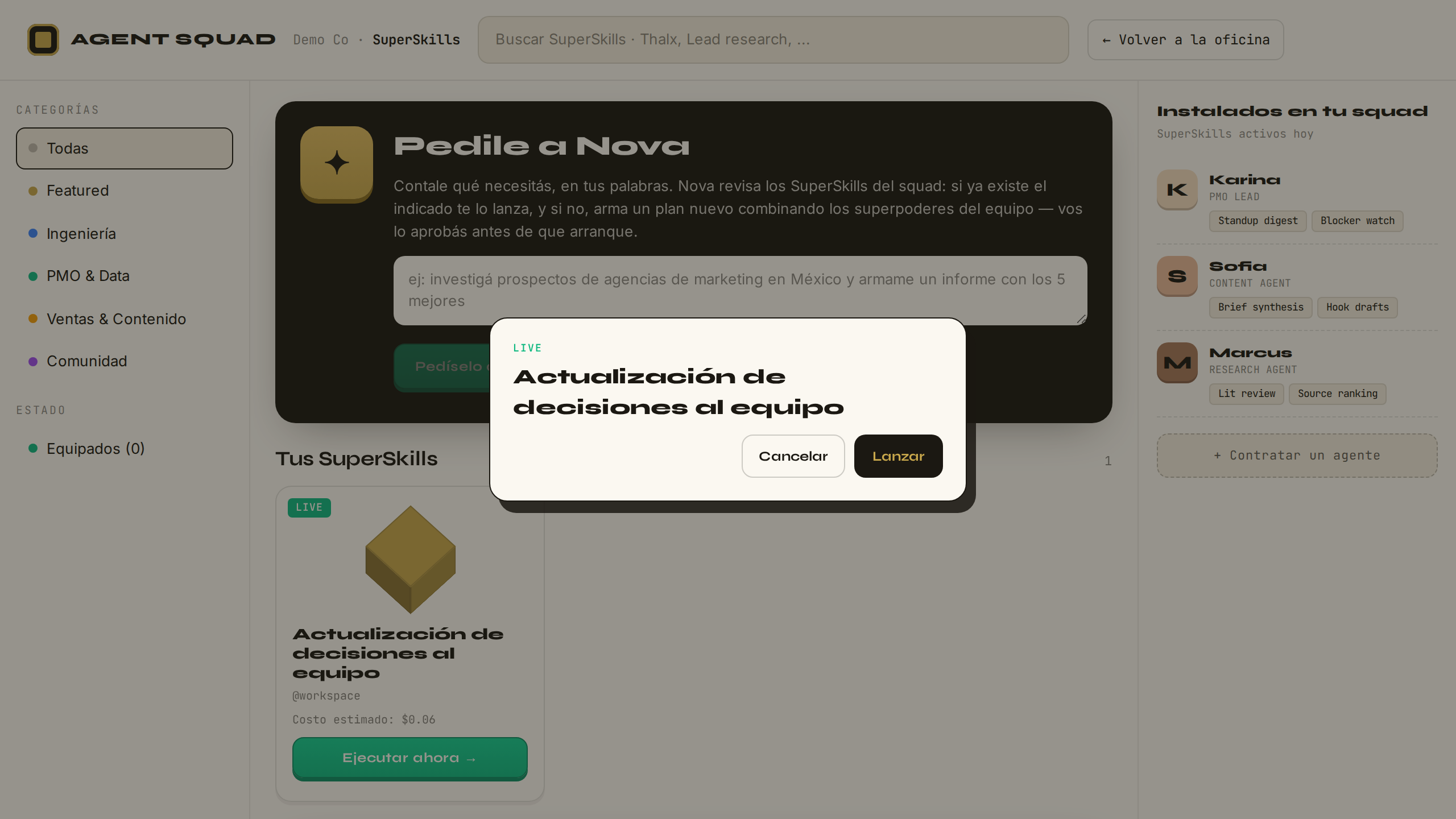
31

Relanzalo cuando quieras, con los datos editablesRelaunch any time, with editable inputs

● PRODUCTIVO● PRODUCTION

Tocá "Ejecutar ahora" en tu SuperSkill: se abre la confirmación de lanzamiento — y si el plan declara datos variables, aparecen pre-llenados con los de la vez anterior, editables antes de confirmar. Confirmás, y el mismo plan corre de nuevo. Hit "Run now" on your SuperSkill: the launch confirmation opens — and if the plan declares variable inputs, they appear pre-filled with last time's values, editable before confirming. Confirm, and the same plan runs again.

Modal de lanzamiento del SuperSkill con datos pre-llenados
VERIFICADOVERIFIED
Qué pasa por detrásBehind the scenes

Lanzar un SuperSkill propio pasa por EXACTAMENTE el mismo camino que los de fábrica: el servidor compila el plan y verifica estructuralmente que el punto de aprobación humana exista, sea terminal y no tenga escapatoria — también en los planes guardados; ningún plan sin gate humano puede ejecutarse. Los datos que editás se filtran contra los que el plan declara: nada extra viaja al motor. Nota de honestidad: en esta verificación el harness abre el modal, comprueba los datos pre-llenados y CANCELA — encolar trabajo real en cada corrida ensuciaría el feed de outputs. El lanzamiento real está cubierto por la suite E2E y fue verificado en vivo con un trace real al construir la feature.

Launching your own SuperSkill goes through EXACTLY the same path as the factory ones: the server compiles the plan and structurally verifies that the human approval gate exists, is terminal, and has no way around it — in saved plans too; no plan without a human gate can run. The inputs you edit are filtered against those the plan declares: nothing extra travels to the engine. Honesty note: in this verification the harness opens the modal, checks the pre-filled inputs and CANCELS — queueing real work on every run would pollute the outputs feed. The real launch is covered by the E2E suite and was verified live with a real trace when the feature was built.

CAPÍTULO 12CHAPTER 12

El equipo nace del trabajoThe team is born from the work

PASOS 32–34STEPS 32–34
32

Contale qué necesitás — Nova repregunta si hace faltaTell it what you need — Nova asks back if needed

● PRODUCTIVO● PRODUCTION

En la propuesta de squad hay un camino opcional: en vez de aceptar el equipo sugerido, contale en tus palabras qué necesitás. Si tu pedido es ambiguo, Nova no adivina: te hace UNA pregunta concreta ("¿es para conseguir clientes o para posicionar la marca?") y el diálogo sigue con memoria — hasta dos repreguntas, nunca un interrogatorio. The squad proposal has an optional path: instead of accepting the suggested team, tell it in your own words what you need. If your request is ambiguous, Nova doesn't guess: it asks you ONE concrete question ("is this for getting clients or positioning the brand?") and the dialogue continues with memory — up to two follow-up questions, never an interrogation.

La conversación inicial: Nova repregunta ante un pedido ambiguo
VERIFICADOVERIFIED
Qué pasa por detrásBehind the scenes

Esto itera SIN un agente de horizonte largo: cada turno es una llamada acotada (60s, un reintento) y la memoria del diálogo vive en el navegador — el transcript completo viaja en cada request y el servidor es stateless. El modelo solo puede responder de tres formas validadas: proponer SuperSkills de una lista cerrada, repreguntar (cap de 2 por conversación, FORZADO por el servidor: agotado el cupo, el prompt lo prohíbe y la validación rechaza el intento), o decir honesto que no puede. El harness manda deliberadamente un pedido ambiguo: si Nova repregunta, responde y verifica que el hilo llegue a propuesta; si propone directo, el diálogo igual queda probado.

This iterates WITHOUT a long-horizon agent: each turn is one bounded call (60s, one retry) and the dialogue's memory lives in the browser — the full transcript travels with every request and the server stays stateless. The model can only answer in three validated ways: propose SuperSkills from a closed list, ask back (capped at 2 per conversation, ENFORCED server-side: once spent, the prompt forbids it and validation rejects the attempt), or honestly say it can't. The harness deliberately sends an ambiguous request: if Nova asks back, it answers and verifies the thread reaches a proposal; if it proposes directly, the dialogue is proven anyway.

33

El equipo nace del trabajo, no al revésThe team is born from the work, not the other way around

● PRODUCTIVO● PRODUCTION

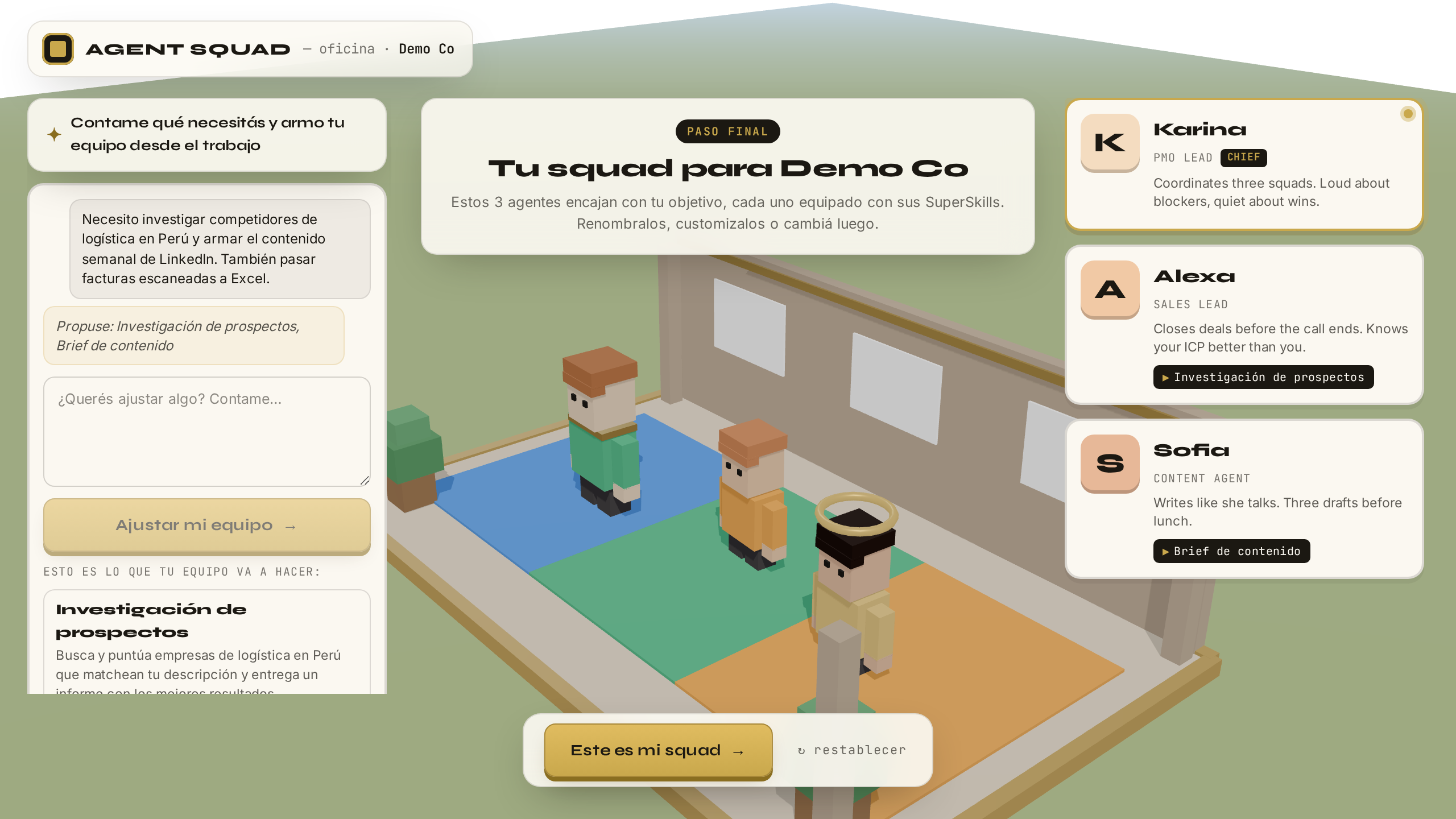
Con el pedido claro, Nova propone los SuperSkills que lo cubren — cada uno con su razón — y dice honesto lo que tu equipo todavía no hace ("pasar facturas a Excel quedó anotado"). Y acá está la tesis: el squad de la derecha cambia para mostrar a los agentes que FIRMAN ese trabajo. Las personas siguen al trabajo, nunca al revés. With the request clear, Nova proposes the SuperSkills that cover it — each with its reason — and honestly states what your team doesn't do yet ("invoices to Excel was noted"). And here's the thesis: the squad on the right changes to show the agents who SIGN that work. People follow the work, never the other way around.

SuperSkills propuestos con razones, lo no cubierto anotado y el squad derivado
VERIFICADOVERIFIED
Qué pasa por detrásBehind the scenes

El LLM elige trabajo; el servidor deriva personas. La recomendación pasa una triple whitelist (validación en el motor, re-validación en el proxy, y derivación que ignora ids desconocidos) — un SuperSkill inventado por el modelo no tiene camino físico hasta tu pantalla. El squad se calcula con una función pura y determinista: la unión de los firmantes de los skills elegidos, con Karina siempre primera como chief. Y cada necesidad no cubierta se registra en el motor como demanda real — la lista de "no pude" prioriza qué construir. Esa telemetría se acumula solo en la primera propuesta de cada conversación: pedir ajustes no infla la señal.

The LLM chooses work; the server derives people. The recommendation passes a triple whitelist (engine validation, proxy re-validation, and a derivation that ignores unknown ids) — a SuperSkill invented by the model has no physical path to your screen. The squad is computed by a pure, deterministic function: the union of the signers of the chosen skills, with Karina always first as chief. And every uncovered need is recorded in the engine as real demand — the "couldn't do it" list prioritizes what to build. That telemetry accrues only on each conversation's first proposal: asking for adjustments doesn't inflate the signal.

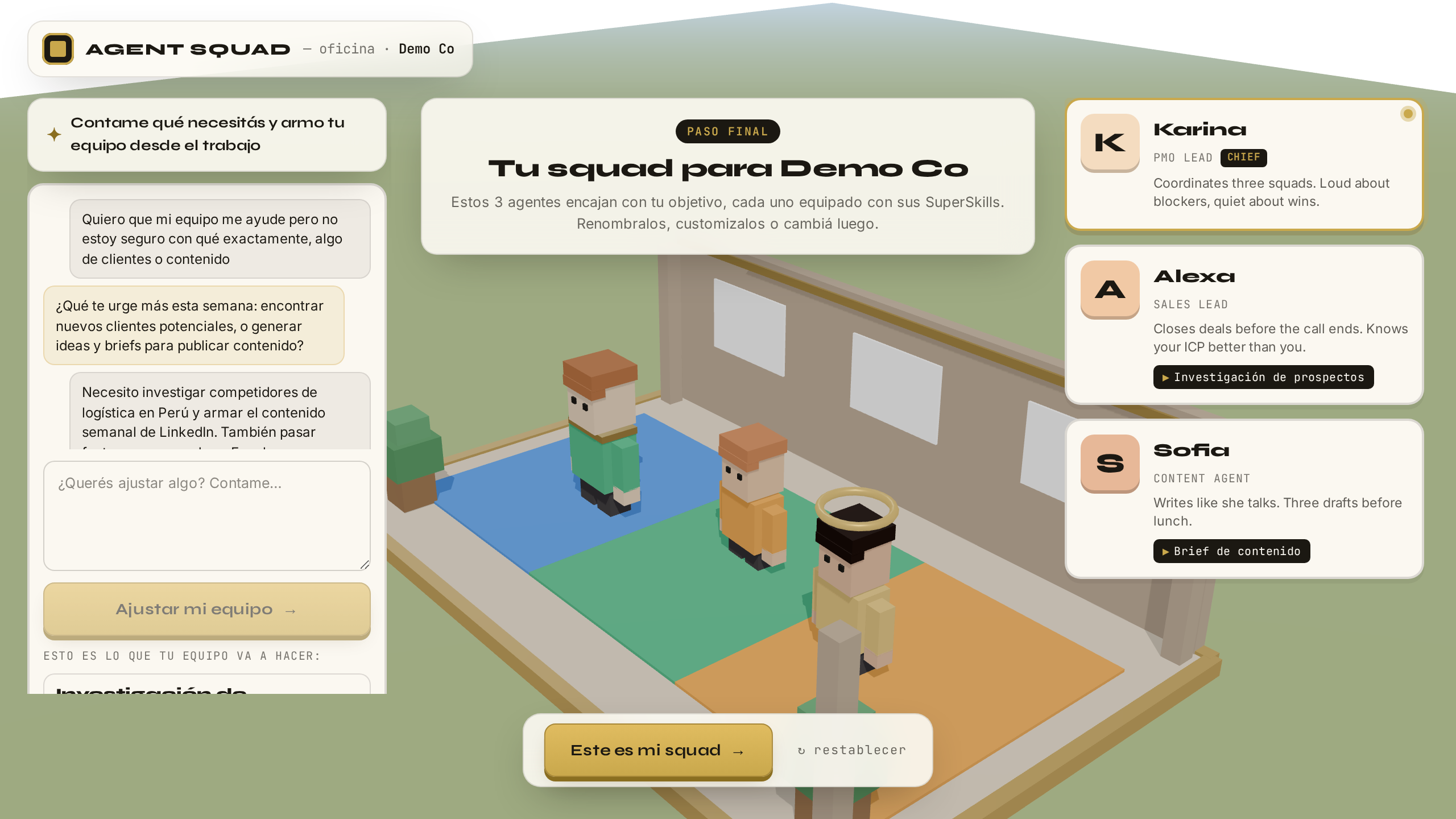
34

Instalá el equipo derivado — un click y a la oficinaInstall the derived team — one click into the office

● PRODUCTIVO● PRODUCTION

"Este es mi equipo": un click instala el squad derivado, le equipa a cada agente sus SuperSkills, y la oficina 3D carga con ellos en sus puestos. Si algo falla en el camino — el motor no responde, la red se corta — la propuesta curada de siempre sigue intacta al lado: este camino suma, nunca rompe. "This is my team": one click installs the derived squad, equips each agent with their SuperSkills, and the 3D office loads with them at their desks. If anything fails along the way — engine down, network drop — the usual curated proposal remains intact beside it: this path adds, never breaks.

La oficina 3D con el equipo derivado instalado
VERIFICADOVERIFIED
Qué pasa por detrásBehind the scenes

Instalar es UNA escritura atómica al perfil (squad + skills equipados juntos, por la misma cola serializada que protege todo el estado del usuario — dos escrituras en vuelo jamás se pisan) y funciona multi-dispositivo: el equipo que armaste acá te espera en cualquier navegador. El fail-soft es total por diseño: el panel entero vive COLAPSADO por default y el camino curado no cambió un pixel — los tests del flujo original corren sin tocarse. Contratar a estos agentes no enciende infraestructura: son las mismas fichas de identidad firmando el mismo catálogo del motor.

Installing is ONE atomic write to the profile (squad + equipped skills together, through the same serialized queue that protects all user state — two in-flight writes never clobber each other) and it works multi-device: the team you built here awaits you in any browser. Fail-soft is total by design: the whole panel lives COLLAPSED by default and the curated path didn't change a pixel — the original flow's tests run untouched. Hiring these agents spins up no infrastructure: they're the same identity cards signing the same engine catalog.

AnexoAnnex

Para los arquitectosFor the architects

El mapa completo del sistema, las cifras del motor, y las respuestas a las preguntas que ya sabemos que van a hacer. The complete system map, the engine figures, and the answers to the questions we already know you are going to ask.

El mapa globalThe global map

CapaLayer Qué esWhat it is
APP SvelteKit 5 (runes) servida por Vercel — serverless, stateless. Dominio app.agentsquadai.com. SvelteKit 5 (runes) served by Vercel — serverless, stateless. Domain app.agentsquadai.com.
IDENTIDADIDENTITY InsForge (BaaS): auth.users con perfil JSONB passthrough, user_access (gate de acceso), magic_links. La app le habla server-side; el navegador nunca ve service keys. InsForge (BaaS): auth.users with JSONB passthrough profile, user_access (access gate), magic_links. The app talks to it server-side; the browser never sees service keys.
MOTOR / ENGINE Caja Hetzner dedicada. Hono sobre Bun (systemd, :4000) + Postgres 16 con pgvector (DiskANN, embeddings 3072d) + Inngest OSS (workflows durables) + Langfuse v3 para observabilidad (web + worker + ClickHouse + MinIO + Redis — el único Redis del sistema vive ahí adentro). Expuesto a internet SOLO vía nginx con superficie mínima (health, workspaces/*, approvals, intents) y bearer token obligatorio, comparado en tiempo constante (timing-safe). El endpoint de Inngest NO es público. Dedicated Hetzner box. Hono on Bun (systemd, :4000) + Postgres 16 with pgvector (DiskANN, 3072d embeddings) + Inngest OSS (durable workflows) + Langfuse v3 for observability (web + worker + ClickHouse + MinIO + Redis — the system's only Redis lives inside it). Exposed to the internet ONLY via nginx with a minimal surface (health, workspaces/*, approvals, intents) and a mandatory bearer token, compared in constant time (timing-safe). The Inngest endpoint is NOT public.
LLM Claude (Anthropic) vía sesión de suscripción Max con CLI headless — adapter propio con fallback a API. Costo marginal $0; el costo "notional" por tokens se registra igual, paso por paso. Claude (Anthropic) via a Max subscription session with headless CLI — in-house adapter with API fallback. Marginal cost $0; the "notional" token cost is recorded anyway, step by step.
EMAILS Resend — SMTP transaccional, dominio verificado. Resend — transactional SMTP, verified domain.

Lo que NO hay (antes de que pregunten)What is NOT there (before you ask)

  • No se generan "programas en Python" por usuario ni por squad — los agentes son actores del catálogo del motor, no procesos. No "Python programs" are generated per user or per squad — agents are actors in the engine's catalog, not processes.
  • No hay Redis en el camino de la app — el único Redis vive dentro del stack de Langfuse (observabilidad). No Redis in the app's path — the only Redis lives inside the Langfuse stack (observability).
  • No hay colas propias — Inngest provee durabilidad, retries y suspensión. No homegrown queues — Inngest provides durability, retries and suspension.
  • No hay Kubernetes — una caja con systemd y 3 stacks de docker compose. No Kubernetes — one box with systemd and 3 docker compose stacks.
  • El grafo del substrato NO es un vector-store opaco — es Postgres tipado, con los embeddings como una columna más. The substrate graph is NOT an opaque vector store — it is typed Postgres, with embeddings as just another column.

Cifras del motor (verificables en vivo)Engine figures (verifiable live)

4
PlanTemplates productivosproduction PlanTemplates
17
Operations
8
Evaluators
43
tests del spec en verdespec tests green
$0.013–0.022
costo notional por digest (real $0 con Max)notional cost per digest (real $0 on Max)
24h
ventana del human-gatehuman-gate window
100+
claims acumuladosclaims accumulated
357 + 242
tests de la app: unit + E2E/visualapp tests: unit + E2E/visual

Las preguntas que ya anticipamosThe questions we anticipated

¿Se genera un programa (Python o lo que sea) por cada usuario o squad?Is a program (Python or otherwise) generated per user or squad?
No. Contratar un agente no crea ningún programa ni proceso nuevo: un agente es una ficha de identidad — nombre, rol, especialidad. El trabajo real ya existe dentro del motor como recetas probadas (los PlanTemplates): cada receta define sus pasos, su orden y qué agente firma cada paso. Cuando lanzás un trabajo, dejás un pedido por escrito (el Intent); el motor lo convierte en un ticket de pasos concretos y ordenados (el Plan) y lo ejecuta un orquestador durable (Inngest) que no pierde el pedido aunque el servidor se reinicie a mitad. Sumar usuarios o agentes no enciende infraestructura nueva: el usuario mil corre sobre el mismo motor que el primero. No. Hiring an agent creates no new program or process: an agent is an identity card — name, role, specialty. The real work already exists inside the engine as proven recipes (the PlanTemplates): each recipe defines its steps, their order, and which agent signs each one. When you launch work, you file a written request (the Intent); the engine turns it into a concrete, ordered step ticket (the Plan) and a durable orchestrator (Inngest) executes it — the request survives even a mid-run server restart. Adding users or agents spins up no new infrastructure: user one thousand runs on the same engine as user one.
¿Hay Redis? ¿Dónde?Is there Redis? Where?
Solo uno, y no está en el camino de la app: vive dentro del stack de Langfuse v3 (observabilidad), junto a ClickHouse y MinIO. Ni la app ni el motor dependen de Redis para servir requests. Only one, and it is not in the app's path: it lives inside the Langfuse v3 stack (observability), next to ClickHouse and MinIO. Neither the app nor the engine depends on Redis to serve requests.
¿Qué crea exactamente el onboarding?What exactly does onboarding create?
Estado en el perfil del usuario en InsForge (profile.app_state, vía endpoint server-side): las 4 respuestas, el flag onboarding_completed y, al instalar la propuesta, el roster de agentes. Nada más — no se aprovisiona infraestructura. State on the user's InsForge profile (profile.app_state, via a server-side endpoint): the 4 answers, the onboarding_completed flag and, when installing the proposal, the agent roster. Nothing else — no infrastructure is provisioned.
¿Cómo se orquesta sin Kubernetes ni colas propias?How is it orchestrated without Kubernetes or homegrown queues?
Una caja Hetzner con systemd y 3 stacks de docker compose. La durabilidad, los retries y la suspensión (el human-gate de 24h con step.waitForEvent) los provee Inngest OSS — las ejecuciones sobreviven reinicios. One Hetzner box with systemd and 3 docker compose stacks. Durability, retries and suspension (the 24h human-gate via step.waitForEvent) come from Inngest OSS — executions survive restarts.
¿La memoria del equipo es un vector-store opaco?Is the team memory an opaque vector store?
No: es Postgres 16 tipado, con pgvector (DiskANN, embeddings 3072d) como una columna más. Los claims son hechos tipados consultables con SQL, no blobs en un índice. No: it is typed Postgres 16, with pgvector (DiskANN, 3072d embeddings) as just another column. Claims are typed facts queryable with SQL, not blobs in an index.
Lectura profundaDeep dive
Agent Squad Substrate — el viaje completoAgent Squad Substrate — the complete journey
La historia completa del motor, capítulo a capítulo: el substrato simbólico, sus decisiones de diseño y su evolución. The complete story of the engine, chapter by chapter: the symbolic substrate, its design decisions and its evolution.

Cómo se verifica este documentoHow this document is verified

El harness tools/manual-walkthrough es un navegador automatizado que ejecuta los 34 pasos de este manual contra app.agentsquadai.com — de verdad: se registra, recibe el email, consume el magic link, lanza el SuperSkill, aprueba el output, conversa con un agente y le pide un plan a Nova. De cada paso guarda la captura y el resultado (pass/fail + timestamp) en verification.json. The tools/manual-walkthrough harness is an automated browser that executes this manual's 34 steps against app.agentsquadai.com — for real: it signs up, receives the email, consumes the magic link, launches the SuperSkill, approves the output, talks to an agent, and asks Nova for a plan. For each step it stores the screenshot and the result (pass/fail + timestamp) in verification.json.

Este documento hace fetch de ese archivo al abrirse y actualiza cada sello. El harness se re-ejecuta antes de cada demo: si un paso se rompe en producción, su sello deja de decir VERIFICADO — el manual no puede mentir sin delatarse. This document fetches that file on open and refreshes every seal. The harness is re-run before every demo: if a step breaks in production, its seal stops saying VERIFIED — the manual cannot lie without exposing itself.